 This time, we’re taking a look at another Sherlock from Hack the Box called PhishNet. We can probably already guess by the name that this is going to be some Blue Team work around investigating emails or a phishing attack or the like and it turns out that this is a fun little adventure into entry-level email header research. If we take a look at the scenario, we get this: “An accounting team receives an urgent payment request from a known vendor. The email appears legitimate but contains a suspicious link and a .zip attachment hiding malware. Your task is to analyze the email headers, and uncover the attacker’s scheme.”
So there we have it. To start off, we download the .zip file attached to the lab and unzip it using the provided password hacktheblue. Inside, we find one file called email.eml.
Task 1: What is the originating IP address of the sender?
To start off and answer a few of these questions, we can just open the .eml file in plain text viewer of our choice. The answer to this one is right near the top. These headers both agree, so this is definitely the answer.
X-Originating-IP: [45.67.89.10]
...
X-Sender-IP: 45.67.89.10
Task 1 Answer: 45.67.89.10
Task 2: Which mail server relayed this email before reaching the victim?
Looking at the headers again, we see the following. The last server to touch it was mail.business-finance.com. HTB didn’t want that, but the IP instead.
Received: from mail.business-finance.com ([203.0.113.25])
	by mail.target.com (Postfix) with ESMTP id ABC123;
	Mon, 26 Feb 2025 10:15:00 +0000 (UTC)
Received: from relay.business-finance.com ([198.51.100.45])
	by mail.business-finance.com with ESMTP id DEF456;
	Mon, 26 Feb 2025 10:10:00 +0000 (UTC)
Received: from finance@business-finance.com ([198.51.100.75])
	by relay.business-finance.com with ESMTP id GHI789;
	Mon, 26 Feb 2025 10:05:00 +0000 (UTC)
Task 2 Answer: 203.0.113.25
Task 3: What is the sender’s email address?
I wasn’t sure if this was a trick or not, but nothing here appears too crazy and these items all agree, so this is definitely the answer.
Return-Path: <finance@business-finance.com>
...
X-Envelope-From: finance@business-finance.com
...
From: "Finance Dept" <finance@business-finance.com>
Task 3 Answer: finance@business-finance.com
Task 4: What is the ‘Reply-To’ email address specified in the email?
This is at the top (second line). This might seem shady at first, but it is pretty common for emails to be sent from one mailbox that’s unmonitored and to have replies directed to a monitored box.
Reply-To: <support@business-finance.com>
Task 4 Answer: support@business-finance.com
Task 5: What is the SPF (Sender Policy Framework) result for this email?
Headers again.
Received-SPF: Pass (protection.outlook.com: domain of business-finance.com designates 45.67.89.10 as permitted sender)
Task 5 Answer: Pass
Task 6: What is the domain used in the phishing URL inside the email?
Reading the email, we find a link coded as follows:
<a href="https://secure.business-finance.com/invoice/details/view/INV2025-0987/payment">Download Invoice</a>
Task 6 Answer: secure.business-finance.com
Task 7: What is the fake company name used in the email?
Check and see how the rogues signed their email.
<p>Best regards,<br>Finance Department<br>Business Finance Ltd.</p>
Task 7 Answer: Business Finance Ltd.
Task 8: What is the name of the attachment included in the email?
Down at the very bottom, under where it starts --boundary123
Content-Type: application/zip; name="Invoice_2025_Payment.zip"

Content-Disposition: attachment; filename="Invoice_2025_Payment.zip"
Task 8 Answer: Invoice_2025_Payment.zip
Task 9: What is the SHA-256 hash of the attachment?
There are probably a lot of ways to do this. In this case, I’m using ripmime (sudo apt install ripmime)
$ ripmime -i email.eml
$ ls
email.eml  Invoice_2025_Payment.zip  textfile0  textfile1
$ sha256sum Invoice_2025_Payment.zip
8379c41239e9af845b2ab6c27a7509ae8804d7d73e455c800a551b22ba25bb4a  Invoice_2025_Payment.zip
Task 9 Answer: 8379c41239e9af845b2ab6c27a7509ae8804d7d73e455c800a551b22ba25bb4a
Task 10: What is the filename of the malicious file contained within the ZIP attachment?
When I try to use unzip to unzip this, I get an error. When I use 7Zip, it yells at me, but extracts a file, giving us the answer.
$ unzip Invoice_2025_Payment.zip
Archive:  Invoice_2025_Payment.zip
  End-of-central-directory signature not found.  Either this file is not
  a zipfile, or it constitutes one disk of a multi-part archive.  In the
  latter case the central directory and zipfile comment will be found on
  the last disk(s) of this archive.
unzip:  cannot find zipfile directory in one of Invoice_2025_Payment.zip or
        Invoice_2025_Payment.zip.zip, and cannot find Invoice_2025_Payment.zip.ZIP, period.

$ 7z x Invoice_2025_Payment.zip

7-Zip 25.01 (x64) : Copyright (c) 1999-2025 Igor Pavlov : 2025-08-03
 64-bit locale=en_US.UTF-8 Threads:128 OPEN_MAX:1024, ASM

Scanning the drive for archives:
1 file, 75 bytes (1 KiB)

Extracting archive: Invoice_2025_Payment.zip

ERRORS:
Unexpected end of archive

--
Path = Invoice_2025_Payment.zip
Type = zip
ERRORS:
Unexpected end of archive
Physical Size = 75
Characteristics = Local

ERROR: Data Error : invoice_document.pdf.bat

Sub items Errors: 1

Archives with Errors: 1

Open Errors: 1

Sub items Errors: 1
Doing a little research, I also apparently could have used exiftool and found the information like this
$ exiftool Invoice_2025_Payment.zip
ExifTool Version Number         : 13.44
File Name                       : Invoice_2025_Payment.zip
Directory                       : .
File Size                       : 75 bytes
File Modification Date/Time     : 2026:02:11 15:52:58-05:00
File Access Date/Time           : 2026:02:11 15:52:58-05:00
File Inode Change Date/Time     : 2026:02:11 15:52:58-05:00
File Permissions                : -rw-------
Warning                         : Format error reading ZIP file
File Type                       : ZIP
File Type Extension             : zip
MIME Type                       : application/zip
Zip Required Version            : 20
Zip Bit Flag                    : 0
Zip Compression                 : Deflated
Zip Modify Date                 : 2025:02:26 15:56:48
Zip CRC                         : 0x2a8e3d17
Zip Compressed Size             : 1249907
Zip Uncompressed Size           : 1690811
Zip File Name                   : invoice_document.pdf.bat
Task 10 Answer: invoice_document.pdf.bat
Task 11: Which MITRE ATT&CK techniques are associated with this attack?
So this information isn’t located in the file. I also searched our SHA256 on VirusTotal and there were a ton of MITRE ATT&CK techniques associated with the file, so I had to think broader. What kind of attack is this? This is a phishing attack. Specifically, it seems like a targeted phishing attack making it likely spearphishing. However, it doesn’t qualify as whaling because this isn’t a single high-value individual being targeted. When we look up Phishing on the MITRE ATT&CK pages, we see this category and sub-categories.
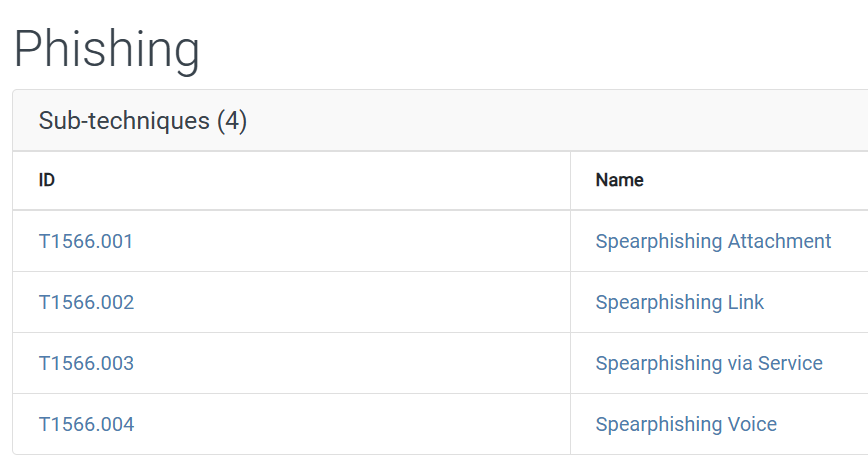
Given that this was phishing with an attachment, I tried T1566.001 and that is what they wanted.
Task 11 Answer: T1566.001