 This post, we are going to tackle a Hack the Box Sherlock called PhantomRing. You can find it here. It is rated Very Easy, but Hack the Box skews a little harder than other sites, so there are still some good learning points here… even if you aren’t on Day 2 of your InfoSec journey. To get started, download the zip and extract the files using the provided password hacktheblue. Inside, you’ll find one file called simply agent.
Our given scenario is
Your organization's SOC team intercepted a suspicious binary during a routine threat hunting operation on a Linux server. The file was found in /var/tmp with an unusual name and was attempting to establish outbound connections. Initial analysis suggests this could be a post-exploitation agent. Your task is to perform static analysis on the binary to identify its capabilities, extract indicators of compromise, and understand the threat actor's infrastructure.
Task 1 Question: What is the SHA256 hash of the malicious binary?
This starts out easily enough. If you’re using Linux, you can just issue this command and get the result. (PS… yes this hash is in VirusTotal)
$ sha256sum agent
2d7b1b2178f76c26893b2a56cbf9b36700235259e76b893d53817d5b66b634a5  agent
Task 1 Answer: 2d7b1b2178f76c26893b2a56cbf9b36700235259e76b893d53817d5b66b634a5
Task 2 Question: What is the IP address hardcoded in the binary for C2 communication?
Let’s use strings right off the bat. That might help us with a few of these next couple of questions. In this case, I only see one IP Address returned.
$ strings agent
/lib64/ld-linux-x86-64.so.2
_ITM_deregisterTMCloneTable
## SNIP ##
get
recv
users
netstat
kick
privesc
sdestruct
killbpf
exit
[*] 404 Command not found [*]
io_uring_queue_init
192.168.56.1
socket
io_uring_wait_cqe: %s
connect() failed: trying to reconnect
## SNIP ##
.data
.bss
.comment
Task 2 Answer: 192.168.56.1
Task 3 Question: What port does the agent connect to on the C2 server?
Okay, the strings thing was a naive way to approach this and I knew Hack the Box would drive this deeper. I don’t see anything overtly obvious in strings, so I decided to use Ghidra to decompile it. You know you can do it without difficulty because it isn’t a stripped binary. How do I know that? If you run the file command on the file, it tells you.
$ file agent
agent: ELF 64-bit LSB pie executable, x86-64, version 1 (SYSV), dynamically linked, interpreter /lib64/ld-linux-x86-64.so.2, BuildID[sha1]=1f617f2ea259a7ec724d7bbc01627982dc2f0495, for GNU/Linux 3.2.0, not stripped
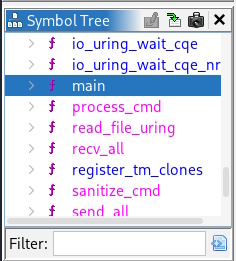
This isn’t a Ghidra tutorial (and trust me, you wouldn’t want me to give you one), but here are the steps I took. I created a new project, did File -> Import File to bring in the agent executable, and then after it loaded, right clicked it and did Open With -> CodeBrowser. Then, on the left hand side, there is a section called Symbol Tree. Scroll into functions, find the main and click to select it.
Then, go to the menu at the top of Ghidra and select Window -> Decompile:main (or hit CTRL-E).
That opens a code window to the right of the assembly code you had been looking at. It is written in C and doesn’t have any variables named in a friendly way. However, you can scan over the code or read through if you’re familiar with C. I was looking for something related to this network call, and found where it logged out what was being attempted.
printf("[+] Connected to %s:%d\n","192.168.56.1",0x115d);
That string format is telling you it is going to output this in the format of string:decimal and we know the string is going to be 192.168.56.1. But what’s the decimal? The decimal is being represented by the hex of 0x115d, which if you hover on it in CodeBrowser (or do the math), tells you that is 4445. And that’s our answer.
Task 3 Answer: 4445
Task 4 Question: How many seconds does the agent wait before attempting to reconnect after a failed connection?
Inside one of the nested while(true) loops, as it ends, the code does this:
sleep(0x78);
0x78 (again, do the math or hover on the value in Ghidra) is 120, which is our answer.
Task 4 Answer: 120
Task 5 Question: How many different commands does the agent support? (excluding invalid commands)
Over in the Symbol Tree, there is another function called process_cmd. Since we already have the Decompile window open, just click on process_cmd and the relevant code shows up. There is a long if-else statement in there that covers all the commands: recv, users, ss, netstat, ps, me, kick, privesc, sdestruct, killbpf, and exit.
Task 5 Answer: 11
Task 6 Question: What Linux kernel interface does this malware abuse to evade EDR syscall monitoring?
So, this one is what gives the room its name. If you look in the symbol tree, there are a ton of calls to io_uring_cq_advance, io_uring_cqe_seen, io_uring_prep_close… I think 14 in total. Googling it, you see that this interface was abused in RingReaper malware, so that should be our answer… and it is.
Task 6 Answer: io_uring
Task 7 Question: What file does the agent read to enumerate logged-in users?
Another function is called cmd_users, if we open it for decompile, we see the file being read
iVar2 = read_file_uring(param_1,"/var/run/utmp",local_4018,0x2000);
Task 7 Answer: /var/run/utmp
Task 8 Question: What directory does the agent scan when searching for SUID binaries for privilege escalation?
There is another function called cmd_privesc. Inside there, you can see this, giving us our answer.
local_4330 = opendir("/usr/bin");
Task 8 Answer: /usr/bin
Task 9 Question: What string does the agent search for in /proc/[pid]/maps to identify security tools using eBPF?
In the function, cmd_killbpf, if we scan down we can find this path. While working in there, it reads the file for the process (using read_file_uring), then searches for the string anon_inode:bpf-map
snprintf(local_6118,0x100,"/proc/%s/maps",local_6150->d_name);
*(undefined8 *)(puVar6 + -0x11a8) = 0x103cb2;
iVar2 = read_file_uring(param_1,local_6118,local_4018,0x4000);
} while (iVar2 < 1);
  *(undefined8 *)(puVar6 + -0x11a8) = 0x103cde;
  pcVar4 = strstr(local_4018,"anon_inode:bpf-map");
Task 9 Answer: anon_inode:bpf-map
Task 10 Question: What is the full path of the first tracing file the agent attempts to disable?
Same function. The first one in the array is the answer.
  local_6138[0] = "/sys/kernel/debug/tracing/tracing_on";
  local_6138[1] = "/sys/kernel/debug/tracing/set_event";
  local_6138[2] = "/sys/kernel/debug/tracing/current_tracer";
Task 10 Answer: /sys/kernel/debug/tracing/tracing_on
Task 11 Question: What procfs path does the agent read to find its own executable location before self-destruction?
In cmd_selfdestruct, it is right here:
local_2a8 = readlink("/proc/self/exe",local_218,0x1ff);
Task 11 Answer: /proc/self/exe
Task 12 Question: What command string is compared by the agent to trigger deletion of its own binary?
Back in Task 5, I listed all the commands and where to see them. It is the obvious one where the if/else leads to cmd_selfdestruct.
Task 12 Answer: sdestruct
And here we go.

Any questions, let me know.