 Today, we’re tackling another Sherlock from HackTheBox called Vantage. You can find the room here. Download the Vantage.zip from the page and use the password hacktheblue to unzip it. Inside, you’ll find 2 .pcap files called controller.2025-07-01.pcap and web-server.2025-07-01.pcap. We will use these to answer the 14 Task Questions on this challenge. It is marked at “very easy”, but this does require some skill to pass it. I admit that my Wireshark querying isn’t the best, so I am really enjoying this opportunity to practice and get better. Our scenario is this:
A small company moved some of its resources to a private cloud installation. The developers left the redirect to the dashboard on their web server. The security team got an email from the alleged attacker stating that the user data was leaked. It is up to you to investigate the situation.
Let’s dig in. I will say that I might not always take the best, most efficient way to find these answers, but I will find them honestly and in a way that hopefully you can repeat. There are some questions when the answer could be found by a little brute force earlier in the process, but I wanted to try to have a methodology that would work in situations where brute force may not be practical (like real life situations).
Task 1: What tool did the attacker use to fuzz the web server ? (Format- include version e.g, nmap@7.80)
Because this question is asking about fuzzing a web server, I started by opening the web-server.2025-07-01.pcap file in Wireshark. To fuzzing, we only care about http traffic. So in the search bar in Wireshark, I just typed http and hit enter. This returned 7482 of the 21650 total packets.
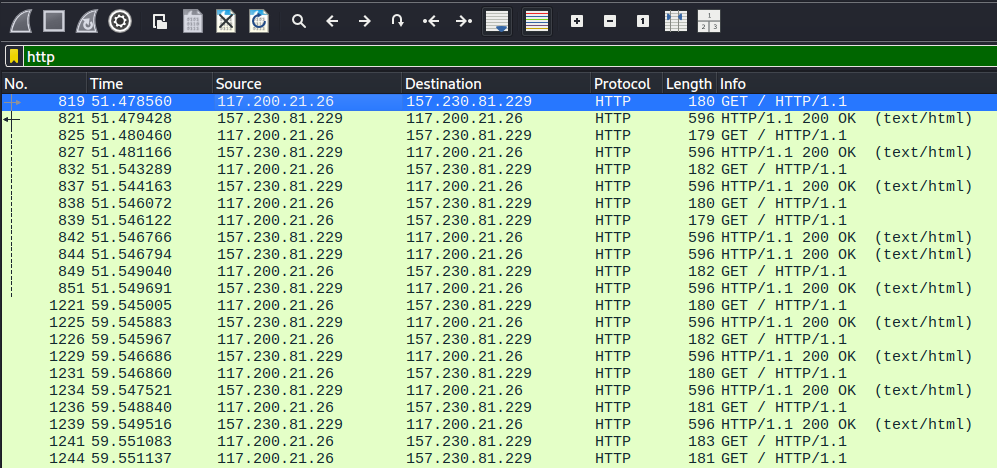
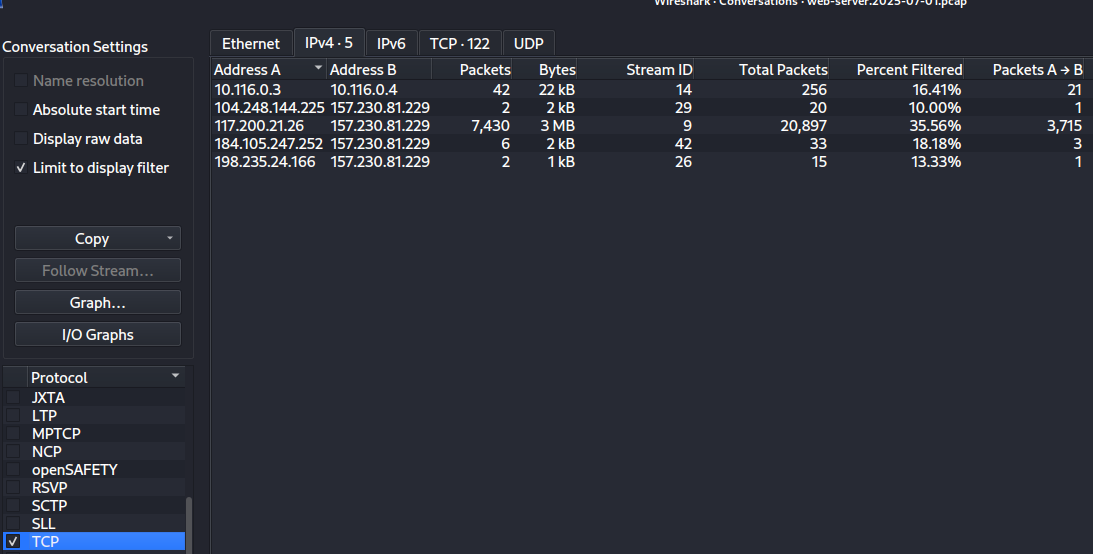
We can see a lot of requests and responses back to back. If we go in the menu to Statistics -> Conversations -> TCP and check the IPv4 tab (there is nothing in IPv6), we see a TON of this traffic is coming from 117.200.21.26 and going to 157.230.81.229.
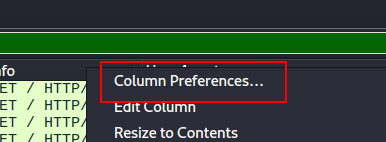
Next, I applied a filter of http && ip.src == 117.200.21.26 to see what that person is doing. But we need the user agent. You can dig through the packets and find what you want and Right Click -> Apply as Column and you’ll see that value for every request in the table. But this is what I’m REALLY bad at. I know the general makeup for network requests on the wire, but sometimes some things are hard to find. Here’s an easy way to do the same thing. Right Click in the Header of the results and choose Column Preferences.
Then click the Plus sign to add your custom column
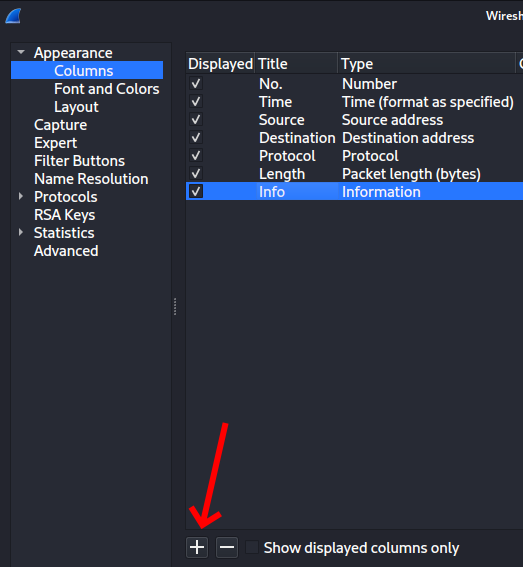
A new column will appear titled “New Column” of type “Custom”. If you double click in each cell, you can edit. Change your values to this and click Apply and OK.
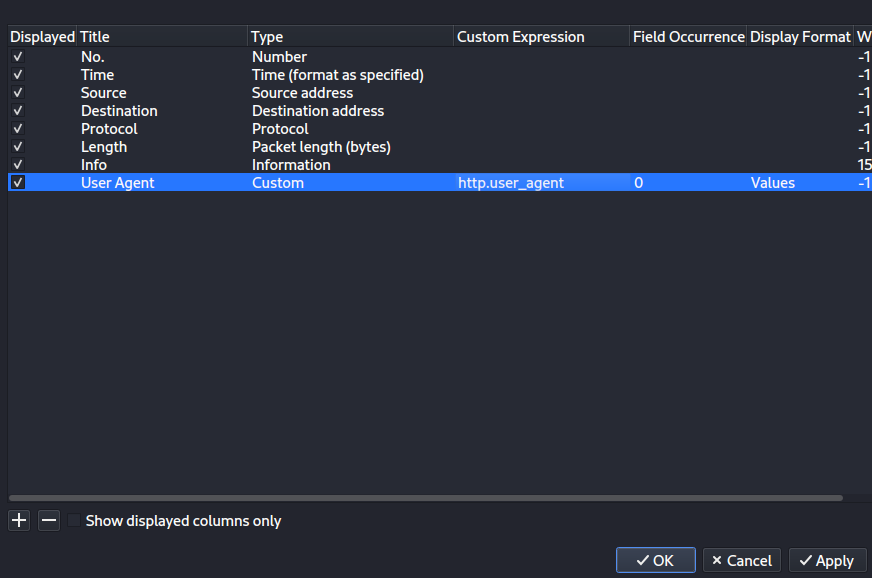
This shows you the answer. You can kind of skim down and see the same value over and over again of Fuzz Faster U Fool v2.1.0-dev. The answer wants something with a mask of ****@*.*.*. I happen to know that the popular fuzzing tool ffuf stands for “Fuzz Faster U Fool” (check out my post I did on ffuf for my Core Tools You Should Know series). Using the abbreviation seems to meet that criteria and trying it completes the task.
Task 1 Answer: ffuf@2.1.0
Task 2: Which subdomain did the attacker discover?
For this one, we already know that ffuf was being used to fuzz things. What we care about were times when it returned 200 OK or maybe even a redirect and not 404 Not Found. When I do that (using the IP we discovered above as the destination) with a filter like this
ip.dst == 117.200.21.26 && _ws.col.info == "HTTP/1.1 200 OK (text/html)"
I get a bunch of results. Most of them have a length of 596.
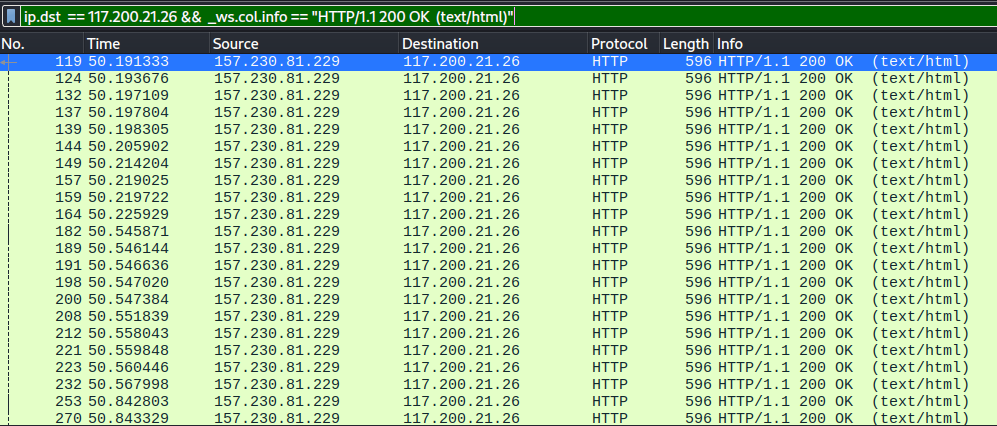
Let’s look for ones that don’t have that length.
ip.dst == 117.200.21.26 && _ws.col.info == "HTTP/1.1 200 OK (text/html)" && frame.len != 596
That only gives me 12 and glancing at the first few, they all are hits to http://cloud.vantage.tech and then other paths. So, there we go.
Task 2 Answer: cloud
Task 3: How many login attempts did the attacker make before successfully logging in to the dashboard?
Okay. First, what is the login URL? We’d know already if this was truly ours, but looking at one of the 12 responses, I see a request to http://cloud.vantage.tech/dashboard/auth/login/. So there we go. Let’s dig in there.
ip.dst == 117.200.21.26 && http.request.uri == "/dashboard/auth/login/"
That attacker hitting that URI happened 4 times. 3 of them returned 200 OK and one returned 302 Found. The 302 is the redirect to let them in. That means they failed 3 times.
Task 3 Answer: 3
Task 4: When did the attacker download the OpenStack API remote access config file? (UTC)
So, step one, what even is that? What I do know is that a file was downloaded. If we use Wireshark and choose File -> Export Objects -> HTTP, we get a list of objects in the capture. Since this is a file and not a small HTML file, I clicked the Size header to sort by size descending.
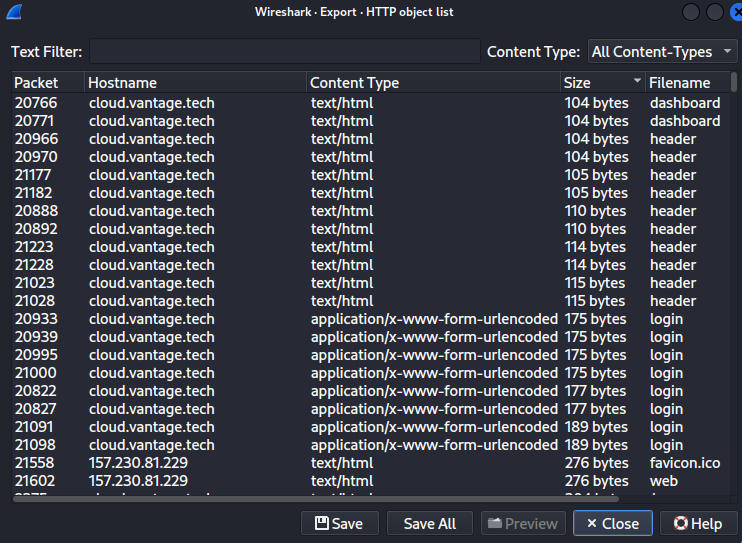
I scrolled down a little and there are 2 packets that are 1941 bytes each that have a filename of openrc. They are packets 21256 and 21260. Looking at those 2 packets, 20707 went from 10.116.0.4 to 10.116.0.3. 20711 went from 157.230.81.229 to our guy at 117.200.21.26. They also have the same timestamp on them, so we win either way. I’m just showing the relevant part under Hypertext Transfer Protocol
Hypertext Transfer Protocol, has 3 chunks (including last chunk)
    HTTP/1.1 200 OK\r\n
        Response Version: HTTP/1.1
        Status Code: 200
        [Status Code Description: OK]
        Response Phrase: OK
    Date: Tue, 01 Jul 2025 09:40:29 GMT\r\n
    Server: Apache/2.4.58 (Ubuntu)\r\n
    Content-Disposition: attachment; filename="admin-openrc.sh"\r\n
Task 4 Answer: 2025-07-01 09:40:29
Task 5: When did the attacker first interact with the API on controller node? (UTC)
Okay, now we switch to opening the controller.2025-07-01.pcap file. I added this filter and found the first HTTP request.
ip.src==117.200.21.26 && http
Within the Frame, we have this and it gives us the answer.
Frame 8490: Packet, 293 bytes on wire (2344 bits), 293 bytes captured (2344 bits)
    Encapsulation type: Linux cooked-mode capture v2 (210)
    Arrival Time: Jul  1, 2025 05:41:44.667723000 EDT
    UTC Arrival Time: Jul  1, 2025 09:41:44.667723000 UTC
    Epoch Arrival Time: 1751362904.667723000
Task 5 Answer: 2025-07-01 09:41:44
Task 6: What is the project id of the default project accessed by the attacker?
This is another one where if people from our company were doing the forensics, we’d already know how to look. But you and I are guessing, so I made an assumption that the URL would have project in it and did this filter
ip.src==117.200.21.26 && http.request.uri contains "project"
That gives me only 5 requests and one looks super obvious. If I right-click on that one and choose Follow -> HTTP Stream we get this, which contains our answer.

GET /identity/v3/projects?domain_id=default&name=admin HTTP/1.1
Host: 134.209.71.220
User-Agent: openstacksdk/4.6.0 keystoneauth1/5.11.1 python-requests/2.32.4 CPython/3.13.5
Accept-Encoding: gzip, deflate
Accept: application/json
Connection: keep-alive
X-Auth-Token: gAAAAABoY67QSl3AarKC9p_FCUhm-zdlkNPcgfqpHncXtnKqPhHgH79XnHa-4IrDf4WlL8QpLiKIQOE8C4kq3Tv21nkTpzMAuGXwLZkEeexqQlLfUtyrhmGjKsFvflRlIEZb0A-1oQZLVzdk1021QkPqjVjFonIEIEBgH0oZll7xE2hp7Scnm2o


HTTP/1.1 200 OK
Date: Tue, 01 Jul 2025 09:48:01 GMT
Server: Apache/2.4.58 (Ubuntu)
Content-Type: application/json
Content-Length: 476
Vary: X-Auth-Token
x-openstack-request-id: req-14b6f50c-12f4-48f9-be96-898430e4fe66
Connection: close

{"projects": [{"id": "9fb84977ff7c4a0baf0d5dbb57e235c7", "name": "admin", "domain_id": "default", "description": "Bootstrap project for initializing the cloud.", "enabled": true, "parent_id": "default", "is_domain": false, "tags": [], "options": {}, "links": {"self": "http://134.209.71.220/identity/v3/projects/9fb84977ff7c4a0baf0d5dbb57e235c7"}}], "links": {"next": null, "self": "http://134.209.71.220/identity/v3/projects?domain_id=default&name=admin", "previous": null}}
Task 6 Answer: 9fb84977ff7c4a0baf0d5dbb57e235c7
Task 7: Which OpenStack service provides authentication and authorization for the OpenStack API?
I literally just Googled the question. The answer came right up.
Task 7 Answer: keystone
Task 8: What is the endpoint URL of the swift service?
I have no idea what this is either. This is another thing that if you worked for a company (or were even doing an investigation for a company that contracted you), you would have intel on this kind of thing. As it is, I googled it, the AI overview included this
Structure: http://:8080/v1/AUTH_
Okay, so I went into Statistics -> Http -> Requests. I scanned down until I found the part hitting port 8080 with a /V1/Auth pattern and bingo.
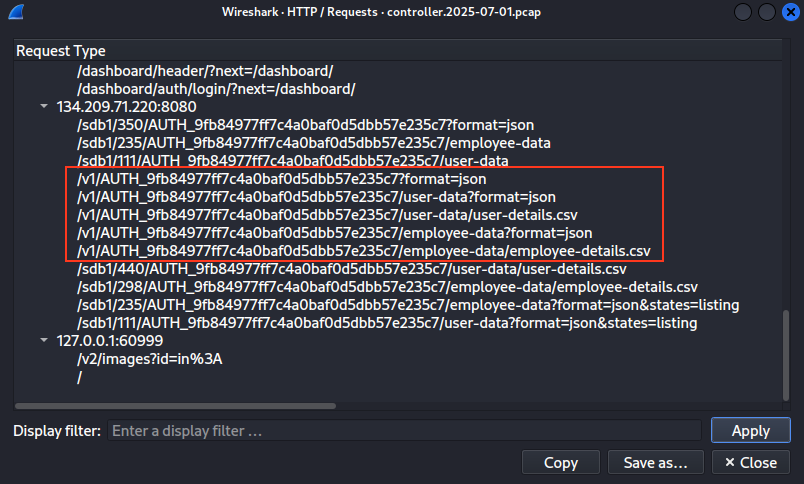
Task 8 Answer: http://134.209.71.220:8080/v1/AUTH_9fb84977ff7c4a0baf0d5dbb57e235c7
Task 9: How many containers were discovered by the attacker?
So I did a filter of http.request.uri == “/v1/AUTH_9fb84977ff7c4a0baf0d5dbb57e235c7?format=json”. This gave me 2 results. I right clicked on the first one and chose Follow -> HTTP Stream. I can see that the response back was
[{"name": "dev-files", "count": 0, "bytes": 0, "last_modified": "2025-07-01T04:22:36.008860", "storage_policy": "Policy-0"}, {"name": "employee-data", "count": 0, "bytes": 0, "last_modified": "2025-07-01T04:22:28.334080", "storage_policy": "Policy-0"}, {"name": "user-data", "count": 0, "bytes": 0, "last_modified": "2025-07-01T04:22:07.707130", "storage_policy": "Policy-0"}]
That represents 3 containers: dev-files, employee-data, and user-data.
Task 9 Answer: 3
Task 10: When did the attacker download the sensitive user data file? (UTC)
If we look at the statistics again, we see a download of user-details.csv. If I put the filter to http.request.uri == “/v1/AUTH_9fb84977ff7c4a0baf0d5dbb57e235c7/user-data/user-details.csv” and right click and chose Follow -> HTTP Stream, you can see the time.
HTTP/1.1 200 OK
Content-Type: text/csv
Etag: 2197a57085557424cefc95f85efb7499
Last-Modified: Tue, 01 Jul 2025 04:31:31 GMT
X-Timestamp: 1751344290.17360
Accept-Ranges: bytes
Content-Length: 1367
X-Trans-Id: tx89c3d915d2c64b1c8cda1-006863ae33
X-Openstack-Request-Id: tx89c3d915d2c64b1c8cda1-006863ae33
Date: Tue, 01 Jul 2025 09:45:23 GMT
Connection: keep-alive
Task 10 Answer: 2025-07-01 09:45:23
Task 11: How many user records are in the sensitive user data file?
Same request, same stream window I have up from Task 10. You can see the response has this file’s contents and I count 28 records.
Full Name,Email,Phone Number
John Doe,john.doe@example.com,(123) 456-7890
Jane Smith,jane.smith@example.com,(234) 567-8901
Alice Johnson,a.johnson@example.com,(345) 678-9012
Bob Brown,b.brown@example.com,(456) 789-0123
Charlie Davis,c.davis@example.com,(567) 890-1234
Diana Wilson,d.wilson@example.com,(678) 901-2345
Ethan Moore,e.moore@example.com,(789) 012-3456
Fiona Taylor,f.taylor@example.com,(890) 123-4567
George Wilson,g.wilson@example.com,(901) 234-5678
Helen Adams,h.adams@example.com,(012) 345-6789
Ian Lee,i.lee@example.com,(123) 456-7890
Julia Smith,j.smith@example.com,(234) 567-8901
Kevin Miller,k.miller@example.com,(345) 678-9012
Laura Evans,l.evans@example.com,(456) 789-0123
Michael Thomas,m.thomas@example.com,(567) 890-1234
Natalie Wilson,n.wilson@example.com,(678) 901-2345
Oliver Johnson,o.johnson@example.com,(789) 012-3456
Penny Davis,p.davis@example.com,(890) 123-4567
Quinn Lee,q.lee@example.com,(901) 234-5678
Rachel Moore,r.moore@example.com,(012) 345-6789
Simon Evans,s.evans@example.com,(123) 456-7890
Tara Wilson,t.wilson@example.com,(234) 567-8901
Uma Johnson,u.johnson@example.com,(345) 678-9012
Vivian Lee,v.lee@example.com,(456) 789-0123
William Thomas,w.thomas@example.com,(567) 890-1234
Xander Wilson,x.wilson@example.com,(678) 901-2345
Yara Johnson,y.johnson@example.com,(789) 012-3456
Zoe Lee,z.lee@example.com,(890) 123-4567
Task 11 Answer: 28
Task 12: For persistence, the attacker created a new user with admin privileges. What is the username of the new user?
For this one, I went back to the statistics with all of the URLs and made some assumptions. This API seems fairly well-designed in a “discoverable” sense. That means I expect a user will be created by issuing a POST to a URL that has user or users in it. Glancing in my list, I see /identity/v3/users, so I changed my filter to http.request.uri == “/identity/v3/users” to see what we get.

Here we can see a POST and a response of 201-CREATED. That seems promising. If we right click and Follow -> HTTP Stream on the post request, we get this with our user’s name.
POST /identity/v3/users HTTP/1.1
Host: 134.209.71.220
User-Agent: openstacksdk/4.6.0 keystoneauth1/5.11.1 python-requests/2.32.4 CPython/3.13.5
Accept-Encoding: gzip, deflate
Accept: */*
Connection: keep-alive
X-Auth-Token: gAAAAABoY67QSl3AarKC9p_FCUhm-zdlkNPcgfqpHncXtnKqPhHgH79XnHa-4IrDf4WlL8QpLiKIQOE8C4kq3Tv21nkTpzMAuGXwLZkEeexqQlLfUtyrhmGjKsFvflRlIEZb0A-1oQZLVzdk1021QkPqjVjFonIEIEBgH0oZll7xE2hp7Scnm2o
Content-Type: application/json
Content-Length: 130

{"user": {"password": "P@$$word", "enabled": true, "default_project_id": "9fb84977ff7c4a0baf0d5dbb57e235c7", "name": "jellibean"}}
HTTP/1.1 201 CREATED
Date: Tue, 01 Jul 2025 09:48:02 GMT
Server: Apache/2.4.58 (Ubuntu)
Content-Type: application/json
Content-Length: 312
Vary: X-Auth-Token
x-openstack-request-id: req-70234e40-c6b0-4192-b478-e5cd3732d419
Connection: close

{"user": {"id": "c373da67a62b48f393c45dc071fa80b8", "name": "jellibean", "domain_id": "default", "enabled": true, "default_project_id": "9fb84977ff7c4a0baf0d5dbb57e235c7", "password_expires_at": null, "options": {}, "links": {"self": "http://134.209.71.220/identity/v3/users/c373da67a62b48f393c45dc071fa80b8"}}}
Task 12 Answer: jellibean
Task 13: What is the password of the new user?
Looking at the results in Task 12, we can see the password they set.
Task 13 Answer: P@$$word
Task 14: What is MITRE tactic id of the technique in task 12?
Okay. This isn’t in the files at all and just requires some research. What did Task 12 ask us? It was about creating an account for user persistence (rather than trusting credentials you cracked / uncovered, or leaving a command and control mechanism, etc). Let’s google that. I found out that that is T1136, but the answer wants a sub-technique.
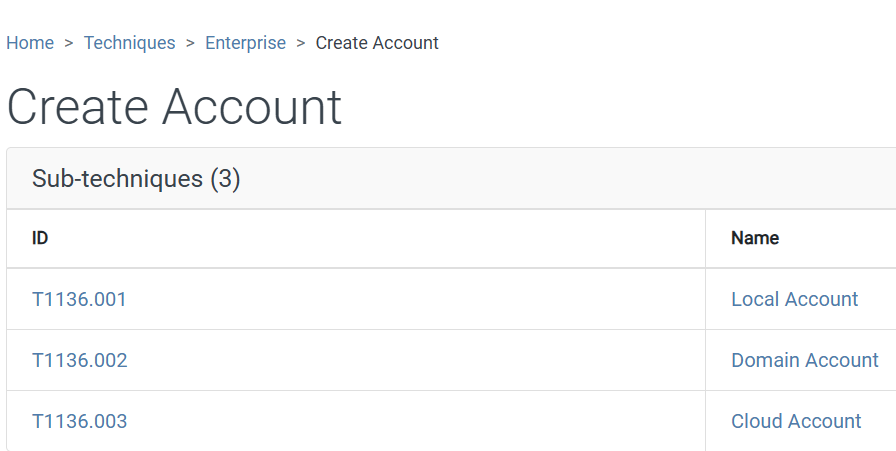
This was a Cloud Account (it wasn’t local to a machine, nor was it on a domain, so this is the most obvious choice), so that makes our answer clear.
Task 14 Answer: T1136.003
And that’s it. This is one of the longest of these that I’ve done. There was a lot of explanations and steps and documentation, but hopefully you all stuck around and I made enough sense to follow along.