A few times recently when I’ve been creating a view for full text indexing on Sql Server, I’ve had need to return the results of a one to many relationship in one row. I didn’t need dynamic columns or anything, what would suit me best would be to have all of the values just in one comma separated list. After searching the net, I found an ingenious use of FOR XML PATH to solve this problem.

Here is the standard query to return the list of employees and their sales territories from the Northwind database.

USE Northwind
go

SELECT e.EmployeeId, e.FirstName, e.LastName, t.TerritoryDescription
FROM Employees e
INNER JOIN EmployeeTerritories et
ON e.EmployeeID = et.EmployeeID
INNER JOIN Territories t
ON et.TerritoryID = t.TerritoryID

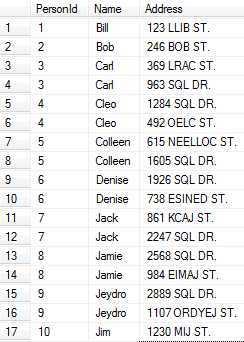
The resulting set looks like the following:
Result set with no grouping or concatenation.

What might be best is some kind of built in function that did the following (kind of like C#’s string.Join()):

USE Northwind
go

-- This Code is fictitious, CONCATENATE() is not a real aggregate function
SELECT e.EmployeeId, e.FirstName, e.LastName, CONCATENATE(t.TerritoryDescription, ',') as TerritoryList
FROM Employees e
INNER JOIN EmployeeTerritories et
ON e.EmployeeID = et.EmployeeID
INNER JOIN Territories t
ON et.TerritoryID = t.TerritoryID
GROUP BY e.EmployeeId, e.FirstName, e.LastName

However, nothing like that was to be found. What I did find was someone who used FOR XML PATH in an interesting way. Normally, FOR XML PATH would return some normal looking xml, however if you pass in the ” as the argument, you just end up with all of the values that would be in an xml string, but with no resulting tag soup.

Running the following code:

USE Northwind
go

SELECT e.EmployeeId, e.FirstName, e.LastName,
STUFF((SELECT ',' + COALESCE(LTRIM(RTRIM(t.TerritoryDescription)), '')
FROM EmployeeTerritories et
INNER JOIN Territories t
on et.TerritoryID = t.TerritoryID
WHERE et.EmployeeID = e.EmployeeId
FOR XML PATH('') ), 1, 1, '') as TerritoryList
FROM Employees e

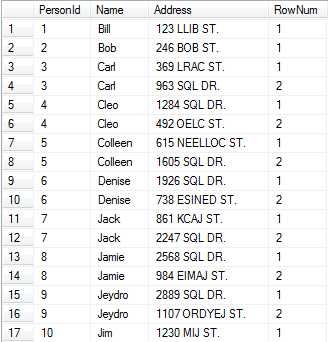
Gives the following result:
Result set with grouping and concatenation.

This does do a subselect, but I’ve found that it doesn’t hurt performance too badly. The only other trick here is the STUFF() function, which replaces part of a string with another. In this case, I’m replacing only the first character (the 1, 1) arguments with just an empty string, effectively removing our extra comma.

I hope that someone may have found this useful and if you have any other techniques for solving this kind of problem, I’d love to hear them.

Dynamics GP
Microsoft Dynamics GP (formerly Great Plains) is a bit of a bear to do integration with. At first, you might think that it should be straightforward. Basically, it is a windows application with a SQL Server backend whose tables (albeit cryptically named) are updated by stored procedures. The problem begins to get deeper when you find out that all of the stored procedures are passed XML documents as parameters.

Microsoft tries to remedy this by offering eConnect (.Net wrapper over COM components that turn objects into the XML files that the procedures need) and the GP Web Services (add a layer). The issue comes, however, when you need some sort of functionality that either doesn’t provide you. Unsurprisingly, you don’t get very far until you exceed the out of the box functionality provided by those products.

The most recent problem that I’ve encountered at work surrounds purchase orders. We create two different kinds of purchase orders. The first is the straight forward purchase order where it is for one or more items and we expect to be invoiced from the vendor for the full amount of the purchase order immediately.

The second kind of purchase order that we create is called a Blanket PO. We create this kind of PO when we contract with a vendor for a rental. We know that a vendor will be billing us X amount of dollars every time period for a certain duration. For instance, if we are renting a widget for $10.00 a month for 6 months, we would create a PO for $60.00 with 6 line items of $10.00 each (each line representing a month). However, we only want to release the first line of the purchase order, since that is all that we are expecting to be invoiced for immediately. In the future, we will release each line as the month that they represent comes up.

We used eConnect to try to automatically create these POs. The problem, however, is that eConnect automatically releases all lines of the blanket PO upon creation. Our second problem is that the update does not expose this property for us to go back and update the lines to unreleased. Since Microsoft encrypts the contents of the stored procedures, we could not inspect or alter what was happening.

After troubleshooting on our end and working with our Microsoft Partner, we eventually had to call Microsoft. The support engineer on the phone confirmed that the procedure in question sets the Release column of the POP10110 table to 1 no matter what the input.

We knew that we could just issue a SQL statement to update the column back to 0, but were unsure what else may need to be affected when that column is updated. GP is notorious for many things needing to be interconnected and we didn’t want to find our POs in some weird state several months down the line. The Microsoft engineers were unsure if anything was affected, so they ran some tests and found that this column operates in isolation and we were free to issue our update statement.

So, after we call eConnect to create the blanket PO, we issue this SQL statement. The POP10110 table holds PO line items (POP10100 holds the PO Header), and in our case, we want to set the Release column all of the lines greater than 1 back to 0 and the Released_Date to ’1/1/1900′ (the default for “no date given” in GP).

DECLARE @PONumber varchar(10)
-- This is set here as an example, but you can put it in a proc
-- or however you want to get the value in.
SET @PONumber = 'PO-1234567'

UPDATE dbo.POP10110
SET Release = 0, Released_Date = '1/1/1900'
WHERE PONumber = @PONumber AND LineNumber > 1

Simple answer to a complex problem.

I’ve received several requests to publish the code to the WSSF tutorial I did last year in its entirety. That series on my blog has by far generated the most traffic, so I wanted to get it up here. Unfortunately, I had long since deleted the code, so I had to work through my own tutorial to get the project coded.

You have to create the right virtual directory for the service for the console application to run (as described in part 5 of the tutorial), but other than that, this should be all you need… binaries are even included.

Enjoy.

WSSF Tutorial Solution

I was listening to Hanselminutes a few weeks back and Scott Hanselman had Uncle Bob Martin on to talk about the SOLID principles of object-oriented design. SOLID stands for

  • Single responsibility principle
  • Open closed principle
  • Liskov substitution principle
  • Interface segregation principle
  • Dependency inversion principle

Obviously, each one of those could warrant its own blog post and Robert Martin himself has written and spoken about them extensively. Uncle Bob did bring up a classic problem on Hanselminutes, though, that I wanted to take some time to talk about.

We who design object-oriented systems have a problem. We’ve been taught that the whole world is made of objects and that we are supposed to model our software after the real world. However, as I’ll cover in this post, sometimes that is a mistake.

The Liskov Substitution Principle says that “Functions that use pointers or references to base classes must be able to use objects of derived classes without knowing it” (Uncle Bob’s paraphrase). I have found this one somewhat confusing in the past, but I think that this Rectangle-Square problem explains the problem very well.

In math, the definition of a rectangle is “a parallelogram with four right angles”. One Webster’s definition of a square is “a rectangle with all four sides equal”. Right in the definition from the real world, a square is a rectangle. “Is a” is often a key phrase in object-oriented design used to denote an inheritance relationship.

So, let’s pretend we have the following code:

public class Rectangle
    {
        public virtual int Width { get; set; }
        public virtual int Height { get; set; }

        public virtual int ComputeArea()
        {
            return Width * Height;
        }
    }

    public class Square : Rectangle
    {
        private int _height;
        public override int Width
        {
            get { return _height; }
            set
            {
                _height = value;
            }
        }

        public override int Height
        {
            get { return _height; }
            set
            {
                _height = value;
            }
        }

        public override int ComputeArea()
        {
            return base.ComputeArea();
        }
    }

Okay, that works. You can run code against it and at first blush it behaves like it should. However, the Liskov Substitution Principle says that you should be able to have

Rectangle r = new Square();

and have no problems.

While you can do that and can then operate on r as if it were a rectangle, there is a problem. A person who only knows about rectangles might do this to our r.

Rectangle r = someMethodThatWillReturnASquareSometimes();
r.Width = 10;
r.Height = 15;

They would then get entirely unpredictable results when they computed the area or even went back in to retrieve the properties (finding one had changed without their knowledge). A person who would want to operate in a safe way would have to eventually do the following:

Rectangle r = someMethodThatWillReturnASquareSometimes();

if (r is Square)
{
  // Special Square Processing
}
else
{
  // Normal Rectangle Stuff
}

That now pretty much defeats the purpose of using base classes and interfaces. If you have to know about derived classes and their implementation, you’ve lost the battle. I think that this is a great reminder to model objects logically how they affect the program, not how they reflect “real life”.

Pro LINQ: Language Integrated Query in C# 2008I love when things come up just in time for me to need them for a project that I’m involved in. Currently, I need to take a bunch of results and find only the intersection of those results. I was contemplating doing some lambdas to compare the lists, but then I was reading Pro LINQ: Language Integrated Query in C# 2008 and I found the Intersect() method. (Note: Thanks to Jeff Meyer for loaning me the book in such a timely fashion.)

The code looks like this: (ignoring the </int></int> that my code formatter seems to keep wanting to interject)

using System;
using System.Collections.Generic;
using System.Linq;

namespace Linq
{
    class Program
    {
        static void Main(string[] args)
        {
            var listOne = new List() { 1, 2, 3, 4, 5};
            var listTwo = new List() { 3, 4, 5, 6, 7};

            var intIntersect = listOne.Intersect(listTwo);

            foreach (var i in intIntersect)
            {
                Console.WriteLine(i);
            }
        }
    }
}

What is output is

3
4
5

There are two important things to note. First of all, you can use any IEnumerable to perform an Intersect. Secondly, it is important to realize that you are comparing from the first list to the second list. This isn’t important when doing an Intersect(), but lets look at another example.

using System;
using System.Collections.Generic;
using System.Linq;

namespace Linq
{
    class Program
    {
        static void Main(string[] args)
        {
            var listThree = new string[] { "Pete", "On", "Software" };
            var listFour = new string[] { "Joel", "On", "Software" };

            var stringExcept = listThree.Except(listFour);

            foreach (var s in stringExcept)
            {
                Console.WriteLine(s);
            }
        }
    }
}

The output of this code is

Pete

In this example, I used a string array instead of a generic List to show that other IEnumerables could be used. When calling the Except() method, I get the unique value(s) from the first IEnumerable. Intersect() would have returned

On
Software

and if I had written

var stringExcept = listFour.Except(listThree);

it would have returned

Joel

so much more care is needed when using Except() to ensure exactly which group has the unique values that you want to keep. However, there is one more thing you can do. What if you want to find every distinct value between the two lists? You would do something like the following

using System;
using System.Collections.Generic;
using System.Linq;

namespace Linq
{
    class Program
    {
        static void Main(string[] args)
        {
            var listThree = new string[] { "Pete", "Pete", "On", "Software" };
            var listFour = new string[] { "Joel", "On", "Software", "Software" };

            var uniqueStrings = listFour.Union(listThree);

            foreach (var s in uniqueStrings)
            {
                Console.WriteLine(s);
            }
        }
    }
}

which returns

Joel
On
Software
Pete

The above shows all of the unique values from the first group and any of the unique values that the second group brings to the party that the first group didn’t already have.

This is pretty powerful stuff if you have to process lists and should ensure that you are doing the most efficient operations possible. Linq is, of course, pretty exciting stuff and as I uncover more nuggets from the Pro LINQ: Language Integrated Query in C# 2008 book, I will share them here.

« Previous PageNext Page »